

Background
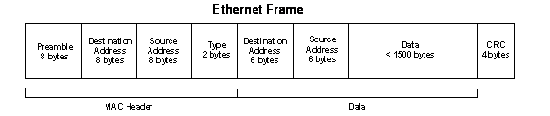
Ethernet traffic moves in units called frames. The maximum size of frames is called the Maximum Transmission Unit (MTU). When a network device gets a frame that is larger than its MTU, the data is either fragmented into smaller frames or dropped. Historically, Ethernet has a maximum frame size of 1500 bytes. An Ethernet packet larger than 1500 bytes is called a jumbo frame.
An Ethernet frame uses a fixed-size header. The header contains no user data, and is overhead. Transmitting a larger frame is more efficient because the overhead-to-data ratio is improved.
Caveats
Performance problems arise when the MTU of one device is different from the MTU of another. Making casual changes to MTU to optimize performance is likely to have the opposite effect of decreasing performance.
If most of your local network devices and applications can be configured for the same jumbo frame size, your network might benefit from larger packets, less fragmentation, and less overhead. In modern equipment, this optimization is becoming less of a problem because of LSO (Large Send Offload), LRO (Large Receive Offload), and TCP offload engines, especially on higher end network interfaces.
All equipment on the same Layer 2 network, which means the same LAN or VLAN, support the same frame size. By default, this was 1500 bytes, but might be higher these days (for example, 1522). If you increase the MTU on one of your end devices, your switch must be able to pass these larger frames (same frame size or larger than the default MTU), and the receiving end must also be able to process these larger frames. If this change is not coordinated, your network might actually run slower, or break.
When should you use jumbo frames?
Use jumbo frames only when you have a dedicated network or VLAN, and you can configure the same MTU (for example, 9000) on all equipment, to increase performance. A good example of this approach is a separate Storage Area Network (SAN). In all other situations, the effort of configuring jumbo frames everywhere on your network is not worth the marginal improvement, and has the potential of slowing down or breaking non-jumbo frame clients.
How can you configure jumbo frames on NETGEAR devices?
For fully managed switches, see How do I configure jumbo frames on a fully managed switch using the main user interface or CLI commands?
For Smart Switches, see How do I configure jumbo frames on a Smart Switch?
For ReadyNAS, see ReadyNAS OS 6: Configuring jumbo frames.
For ReadyDATA, see ReadyDATA: Configuring jumbo frames.