

ReadyNAS storage systems and ReadyNAS software are end-of-life.
Before enabling jumbo frames, we recommend that you read the article Guidance on the use of jumbo frames for more information on how jumbo frames work and if it is suitable for your deployment.
To enable jumbo frames, increase the MTU of the network interface:
- On the ReadyNAS GUI, go to the Network tab.
- Click the interface on which you wish to enable jumbo frames and press Settings.
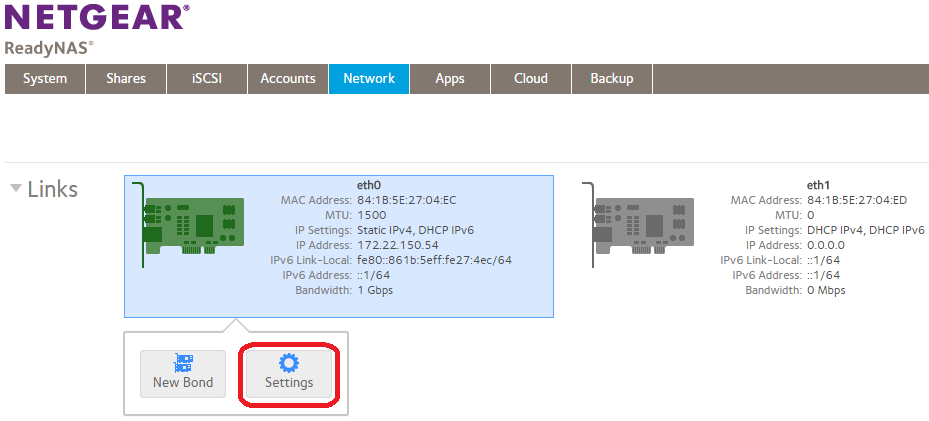
The settings window for that interface appears.
- Under the General tab, increase the MTU to the required value and press Apply.
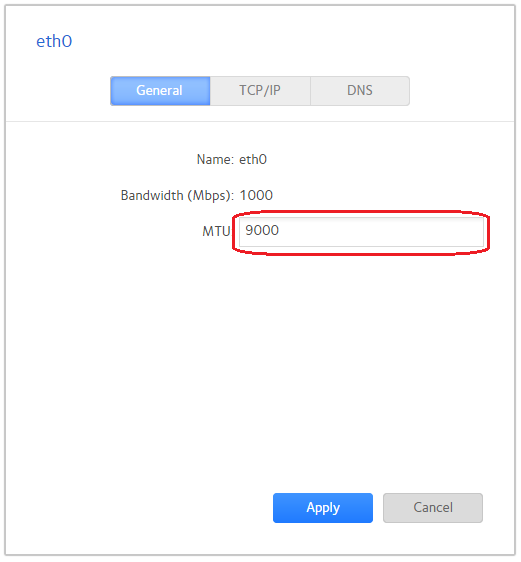
Note: The MTU specified here (9000 in this example) does not include the frame header. Therefore, when configuring jumbo frames on a connected NETGEAR switch, the switch port MTU must be set to a slightly higher value (since this value does include the header).
For fully managed switches, see How do I configure jumbo frames on a fully managed switch using the main user interface or CLI commands?
For Smart Switches, see How do I configure jumbo frames on a Smart Switch?