

The following figure and procedure show how you can use the CLI on a NETGEAR fully managed switch to configure a DHCP pool to assign IP addresses to DHCP clients. For information about configuring a DHCP L3 relay, see How do I configure a DHCP L3 relay using CLI commands on my fully managed switch? or How do I configure a DHCP L3 relay using the device UI on my fully managed switch?
This procedure describes how to use the CLI to make port 1/0/3 a routing interface with RIP enabled, create a DHCP pool with the name dhcp_server, and create a second DHCP pool with the name dhcp_server_second. This procedure also excludes IP addresses 10.200.1.1 and 10.200.2.1 from the DHCP global configuration because these two IP addresses are already used for the DHCP L3 relay (for more information, see the previously mentioned articles).
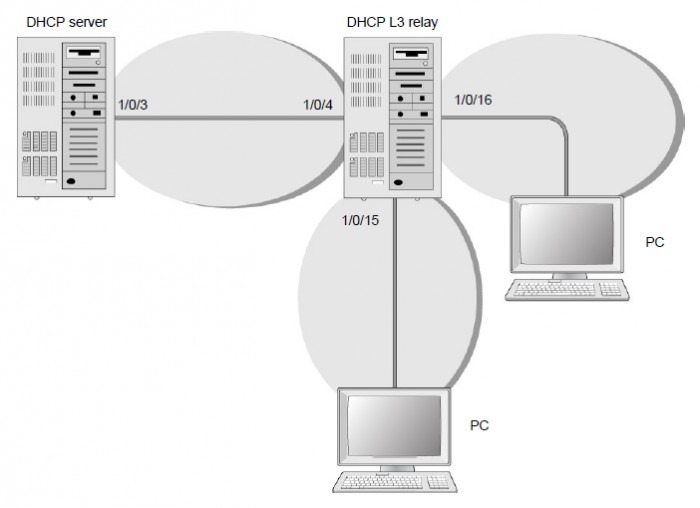
To use the CLI to configure a DHCP pool to assign IP addresses to DHCP clients:
- Enable routing on the switch.
(Netgear Switch) #config

	(Netgear Switch) (Config)#ip routing

	(Netgear Switch) (Config)#
- Create a routing interface and enable RIP on it so that the DHCP server can learn the route 10.200.1.0/24 from the DHCP L3 relay.
(Netgear Switch) (Config)#interface 1/0/3

	(Netgear Switch) (Interface 1/0/3)#routing

	(Netgear Switch) (Interface 1/0/3)#ip address 10.100.1.1 255.255.255.0

	(Netgear Switch) (Interface 1/0/3)#ip rip

	(Netgear Switch) (Interface 1/0/3)#exit
- Create a DHCP pool.
(Netgear Switch) (Config)#ip dhcp pool dhcp_server

	(Netgear Switch) (Config-dhcp-pool)#network 10.200.1.0 255.255.255.0

	(Netgear Switch) (Config-dhcp-pool)#exit

	(Netgear Switch) (Config)#ip dhcp pool dhcp_server_second

	(Netgear Switch) (Config-dhcp-pool)#network 10.200.2.0 255.255.255.0

	(Netgear Switch) (Config-dhcp-pool)#exit

	(Netgear Switch) (Config)#service dhcp

	(Netgear Switch) (Config)#exit
- Exclude IP addresses 10.200.1.1 and 10.200.2.1 from the DHCP pool they are being used on the DHCP L3 relay.
(Netgear Switch) (Config)#ip dhcp excluded-address 10.200.1.1

	(Netgear Switch) (Config)#ip dhcp excluded-address 10.200.2.1
For information about using the device UI, see How do I configure a DHCP server using the device UI on my fully managed switch?