

PIM-SM on Switch A
- Enable IP routing on the switch.
(Netgear Switch)#configure

	(Netgear Switch) (Config)#ip routing
- Enable PIM-SM on the switch
(Netgear Switch) (Config)#ip pim sparse
- Enable IP multicast forwarding on the switch.
(Netgear Switch) (Config)#ip multicast
- Enable RIP to build a unicast IP routing table
(Netgear Switch) (Config)#interface 1/0/1

	(Netgear Switch) (Interface 1/0/1)#routing

	(Netgear Switch) (Interface 1/0/1)#ip address 192.168.2.2 255.255.255.0

	(Netgear Switch) (Interface 1/0/1)#ip rip

	(Netgear Switch) (Interface 1/0/1)#ip pim

	(Netgear Switch) (Interface 1/0/1)#exit


	(Netgear Switch) (Config)#interface 1/0/9

	(Netgear Switch) (Interface 1/0/9)#routing

	(Netgear Switch) (Interface 1/0/9)#ip address 192.168.3.1 255.255.255.0

	(Netgear Switch) (Interface 1/0/9)#ip rip

	(Netgear Switch) (Interface 1/0/9)#ip pim

	(Netgear Switch) (Interface 1/0/9)#exit


	(Netgear Switch) (Config)#interface 1/0/13

	(Netgear Switch) (Interface 1/0/13)#routing

	(Netgear Switch) (Interface 1/0/13)#ip address 192.168.1.2 255.255.255.0

	(Netgear Switch) (Interface 1/0/13)#ip rip

	(Netgear Switch) (Interface 1/0/13)#ip pim

	(Netgear Switch) (Interface 1/0/1)#exit
PIM-SM on Switch B
- Enable the switch to advertise itself as a PIM candidate rendezvous point (RP) to the bootstrap router (BSR).
(Netgear Switch)#configure

	(Netgear Switch) (Config)#ip routing

	(Netgear Switch) (Config)#ip pim sparse

	(Netgear Switch) (Config)#ip multicast

	(Netgear Switch) (Config)#ip pim sparse rp-candidate interface 1/0/11 225.1.1.1 255.255.255.0
- Enable the switch to announce its candidacy as a bootstrap router (BSR).
(Netgear Switch) (Config)#ip pim sparse bsr-candidate interface 1/0/10 30 7


	(Netgear Switch) (Config)#interface 1/0/10

	(Netgear Switch) (Interface 1/0/10)#routing

	(Netgear Switch) (Interface 1/0/10)#ip address 192.168.3.2 255.255.255.0

	(Netgear Switch) (Interface 1/0/10)#ip rip

	(Netgear Switch) (Interface 1/0/10)#ip pim

	(Netgear Switch) (Interface 1/0/10)#exit


	(Netgear Switch) (Config)#interface 1/0/11

	(Netgear Switch) (Interface 1/0/11)#routing

	(Netgear Switch) (Interface 1/0/11)#ip address 192.168.5.1 255.255.255.0

	(Netgear Switch) (Interface 1/0/11)#ip rip

	(Netgear Switch) (Interface 1/0/11)#ip pim

	(Netgear Switch) (Interface 1/0/11)#exit
PIM-SM on Switch C
(Netgear Switch)#configure

(Netgear Switch) (Config)#ip routing

(Netgear Switch) (Config)#ip pim sparse

(Netgear Switch) (Config)#ip multicast

(Netgear Switch) (Config)#ip pim sparse rp-candidate interface 1/0/22 225.1.1.1 255.255.255.0

(Netgear Switch) (Config)#ip pim sparse bsr-candidate interface 1/0/21 30 5

(Netgear Switch) (Config)#interface 1/0/21

(Netgear Switch) (Interface 1/0/21)#routing

(Netgear Switch) (Interface 1/0/21)#ip address 192.168.5.2 255.255.255.0

(Netgear Switch) (Interface 1/0/21)#ip rip

(Netgear Switch) (Interface 1/0/21)#ip pim

(Netgear Switch) (Interface 1/0/21)#exit

(Netgear Switch) (Config)#interface 1/0/22

(Netgear Switch) (Interface 1/0/22)#routing

(Netgear Switch) (Interface 1/0/22)#ip address 192.168.6.1 255.255.255.0

(Netgear Switch) (Interface 1/0/22)#ip rip

(Netgear Switch) (Interface 1/0/22)#ip pim

(Netgear Switch) (Interface 1/0/22)#exit
PIM-SM on Switch D
(Netgear Switch)#configure

(Netgear Switch) (Config)#ip multicast

(Netgear Switch) (Config)#ip routing

(Netgear Switch) (Config)#ip igmp

(Netgear Switch) (Config)#ip pim sparse

(Netgear Switch) (Config)#ip pim rp-candidate interface 1/0/22 225.1.1.1 255.255.255.0

(Netgear Switch) (Config)#ip pim bsr-candidate interface 1/0/22 30 3

(Netgear Switch) (Config)#interface 1/0/21

(Netgear Switch) (Interface 1/0/21)#routing

(Netgear Switch) (Interface 1/0/21)#ip address 192.168.2.1 255.255.255.0

(Netgear Switch) (Interface 1/0/21)#ip rip

(Netgear Switch) (Interface 1/0/21)#ip pim

(Netgear Switch) (Interface 1/0/21)#exit

(Netgear Switch) (Config)#interface 1/0/22

(Netgear Switch) (Interface 1/0/22)#routing

(Netgear Switch) (Interface 1/0/22)#ip address 192.168.6.2 255.255.255.0

(Netgear Switch) (Interface 1/0/22)#ip rip

(Netgear Switch) (Interface 1/0/22)#ip pim

(Netgear Switch) (Interface 1/0/22)#exit

(Netgear Switch) (Config)#interface 1/0/24

(Netgear Switch) (Interface 1/0/24)#routing

(Netgear Switch) (Interface 1/0/24)#ip address 192.168.4.1 255.255.255.0

(Netgear Switch) (Interface 1/0/24)#ip rip

(Netgear Switch) (Interface 1/0/24)#ip igmp

(Netgear Switch) (Interface 1/0/24)#ip pim

(Netgear Switch) (Interface 1/0/24)#exit
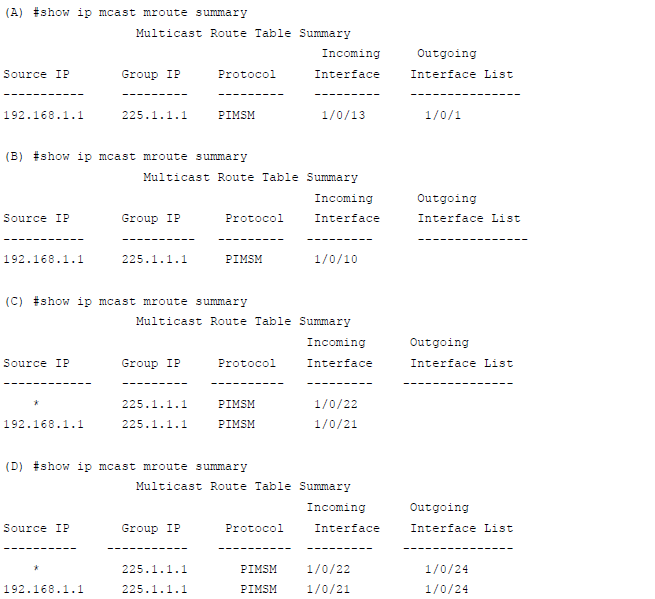
PIM-SM builds the multicast route table on each switch. The following tables show the routes that are built after PIM-SM switches to the source-specific tree from the shared tree.
For more information, see the following support articles:
- What is Protocol-Independent Multicast Sparse Mode (PIM-SM) and how does it work with my managed switch?
- How do I configure Protocol-Independent Multicast Sparse Mode (PIM-SM) using the web interface on my managed switch?
This article applies to the following managed switches and their respective firmware:
- M5300 - firmware version 10.0.0.x
-
- M5300-28G (GSM7228S)
- M5300-5G (GSM7252S)
- M5300-28G3 (GSM7328Sv2h2)
- M5300-52G3 (GSM7352Sv2h2)
- M5300-28G_POE+ (GSM7228PSv1h2)
- M5300-52G-POE+ (GSM7252PSv1h2)
- M5300-28GF3 (GSM7328FSv2)
- XSM7224S - firmware version 9.0.1.x (license required to support the feature described in this article)