

The ReadyDATA can provide protection of shares and LUNs through snapshots. Snapshots contain references to data on a share or LUN. Strictly speaking, snapshots are not backups, but they function as backups because you can recover data from snapshots.
You can only take snapshots of folders or LUNs. You cannot take a snapshot of a volume. Snapshots reside on the same volume as the folder or LUN from which they were created.
The ReadyDATA can automatically take snapshots of a folder or LUN according to a schedule that you specify. You can also manually take or delete individual snapshots at any time. Depending on available storage space, you can keep an unlimited number of snapshots.
If you configure both snapshots and continuous replication, you have continuous protection. For more information, see the What is Replication and how does it work with my ReadyDATA storage system?
WARNING: When the available storage space on a volume decreases below 200 GB, the oldest automatic snapshots are automatically deleted to bring the available storage space back to 200 GB or higher. Manual snapshots are never automatically deleted.
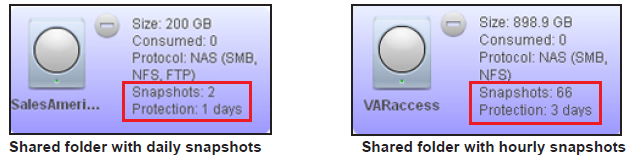
Once protection is available, the shares and LUNs on the Shares screen indicate the number of snapshots and the number of days with protection (a share with daily protection is shown on the left; a LUN with hourly protection is shown on the right):
Note: For snapshots to be accessible to users from their network-attached device, you need to select the Allow snapshot access check box in the Protection section of the Properties pane of a share. For more information, see the How do I view and change the properties of a share on my ReadyDATA storage system?
Rolling back
You can replace a folder or LUN with an earlier version by rolling back to a snapshot. When you roll back to a snapshot, the entire folder or LUN is replaced with the version captured by the snapshot. All snapshots that were taken after the snapshot that was used for rolling back are deleted. For information about how to roll back to a snapshot, see the How do I roll back to a snapshot using the snapshot timeline on my ReadyDATA storage system?
Clones
You can copy a snapshot to become a new independent data set (that is, a new share or LUN). Changes made to the clone do not affect the parent ("origin") and changes made to the parent do not affect the clone. To handle storage in an efficient way, common blocks of data between the parent and the clone are shared. Because the clone is linked to the parent in this way, the parent cannot be deleted when a clone exists. Additionally, the clone cannot be migrated to a volume that does not contain the parent. For information about how to clone snapshots, see the How do I clone a snapshot using the snapshot timeline on my ReadyDATA storage system?