

Your ReadyNAS system can easily change a volume from X-RAID2 to Flex-RAID mode. Data on the X-RAID2 volume is preserved when you switch to Flex-RAID. The RAID level of the resulting Flex-RAID volume is automatically assigned based on the number of disks that are installed.
To change from X-RAID2 to Flex-RAID:
1. Select System > Volumes.
2. Click the X-RAID button at the right side of the screen.
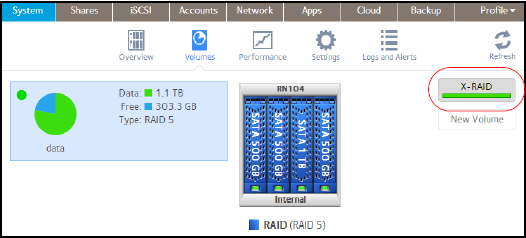
3. Confirm that you want to switch from X-RAID2 to Flex-RAID.
The volume switches from X-RAID2 mode to Flex-RAID mode and the indicator on the X-RAID button turns gray.

The RAID level is automatically assigned based on the number of disks that are installed.
For more information about switching modes from Flex-RAID to X-RAID 2, see the How do I change the volumes on my ReadyNAS OS 6 storage system from Flex-RAID to X-RAID 2?
This article applies to the following ReadyNAS and EDA storage system models:
-
ReadyNAS 102
-
ReadyNAS 104
-
ReadyNAS 312
-
ReadyNAS 314
-
ReadyNAS 316
-
ReadyNAS 516
-
ReadyNAS 2120
-
ReadyNAS 3220
-
ReadyNAS 4220
-
EDA 500