

In compatible mode, the MVR switch does not learn multicast groups; the groups have to be configured by the operator as the MVR does not forward IGMP reports from the hosts (RP port) to the IGMP router (SP port). To operate in this mode, the IGMP router has to be statically configured to transmit all required multicast streams to the MVR switch.
- Create MVlan, VLAN1, VLAN2, and VLAN3.
(Netgear Switch) #vlan database

	(Netgear Switch) (Vlan)#vlan 999,1001, 1002, 1003

	(Netgear Switch) (Vlan)#vlan name 999 mVlan

	(Netgear Switch) (Vlan)#vlan name 1001 Vlan1

	(Netgear Switch) (Vlan)#vlan name 1002 Vlan2

	(Netgear Switch) (Vlan)#vlan name 1003 Vlan3

	(Netgear Switch) (Vlan)#exit
- Enable MVR, configure VLAN 999 as a multicast VLAN, and add group 224.1.2.3 to MVR.
(Netgear Switch) #config

	(Netgear Switch) (Config)#mvr

	(Netgear Switch) (Config)#mvr vlan 999

	(Netgear Switch) (Config)#mvr group 224.1.2.3
- Configure multicast VLAN on the source port.
(Netgear Switch) (Config)#interface 0/9

	(Netgear Switch) (Interface 0/9)#vlan participation include 999

	(Netgear Switch) (Interface 0/9)#vlan tagging 999

	(Netgear Switch) (Interface 0/9)#mvr

	(Netgear Switch) (Interface 0/9)#mvr type source

	(Netgear Switch) (Interface 0/9)#exit
- Configure the receive ports.
Note: The receive port can participate in only one VLAN.
(Netgear Switch) (Config)#interface 0/1

	(Netgear Switch) (Interface 0/1)#vlan participation include 1001

	(Netgear Switch) (Interface 0/1)#vlan pvid 1001

	(Netgear Switch) (Interface 0/1)#vlan participation exclude 1

	(Netgear Switch) (Interface 0/1)#mvr

	(Netgear Switch) (Interface 0/1)#mvr type receiver

	(Netgear Switch) (Interface 0/1)#mvr vlan 999 group 224.1.2.3

	(Netgear Switch) (Interface 0/1)#exit


	(Netgear Switch) (Config)#interface 0/5

	(Netgear Switch) (Interface 0/5)#vlan participation include 1002

	(Netgear Switch) (Interface 0/5)#vlan pvid 1002

	(Netgear Switch) (Interface 0/5)#vlan participation exclude 1

	(Netgear Switch) (Interface 0/5)#mvr

	(Netgear Switch) (Interface 0/5)#mvr stype receiver

	(Netgear Switch) (Interface 0/5)#mvr vlan 999 group 224.1.2.3

	(Netgear Switch) (Interface 0/5)#exit


	(Netgear Switch) (Config)#interface 0/7

	(Netgear Switch) (Interface 0/7)#vlan participation include1003

	(Netgear Switch) (Interface 0/7)#vlan pvid 1003

	(Netgear Switch) (Interface 0/7)#vlan participation exclude 1

	(Netgear Switch) (Interface 0/7)#mvr

	(Netgear Switch) (Interface 0/7)#mvr type receiver

	(Netgear Switch) (Interface 0/7)#mvr vlan 999 group 224.1.2.3

	(Netgear Switch) (Interface 0/7)#exit
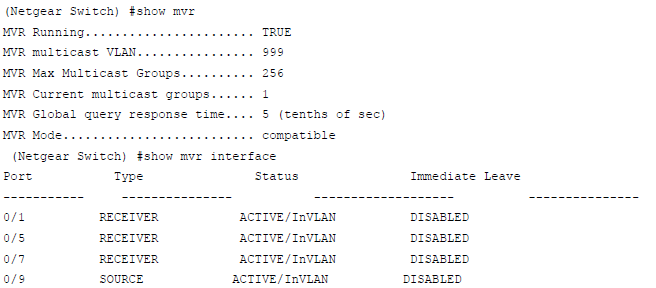
- Show mvr status.
For more information, see the following support articles:
- What is Multicast VLAN Registration (MVR) and how does it work with my managed switch?
- How do I configure Multicast VLAN Registration (MVR) in compatible mode using the web interface on my managed switch?
This article applies to the following managed switches and their respective firmware:
- M5300 - firmware version 10.0.0.x
-
- M5300-28G (GSM7228S)
- M5300-5G (GSM7252S)
- M5300-28G3 (GSM7328Sv2h2)
- M5300-52G3 (GSM7352Sv2h2)
- M5300-28G_POE+ (GSM7228PSv1h2)
- M5300-52G-POE+ (GSM7252PSv1h2)
- M5300-28GF3 (GSM7328FSv2)
- M4100 - firmware version 10.0.1.x
-
- M4100-26G (GSM7224v2h2)
- M4100-50G (GSM7248v2h2)
- M4100-26G-POE (GSM7226Pv1h1)
- M4100-50G-POE+ (GSM7248Pv1h1)
- M4100-26G-POE (FSM7226Pv1h1)
- M4100-50-POE (FSM7250Pv1h1)
- M4100-D12G (GSM5212v1h1)
- M4100-D10-POE (FSM5210Pv1h1)
- M7100 - firmware version 10.0.1.x
-
- M7100-24X (XSM7224)
Last Updated:07/07/2025
|
Article ID: 21782