Enterprise AV Home WiFi Mobile Wifi Support Shop Deals

We're constantly updating the NETGEAR Nighthawk and Orbi apps with new features and enhancements to deliver a great user experience. However, you might occasionally encounter a bug or another type of problem when you're using one of our mobile apps. We can only fix problems that we know about, so we ask that you submit a bug report or logs to us when you experience something that isn't working right.

You can shake your device to trigger the bug report dialog box and send us information, screenshots, and recordings that help us improve our mobile app experience.
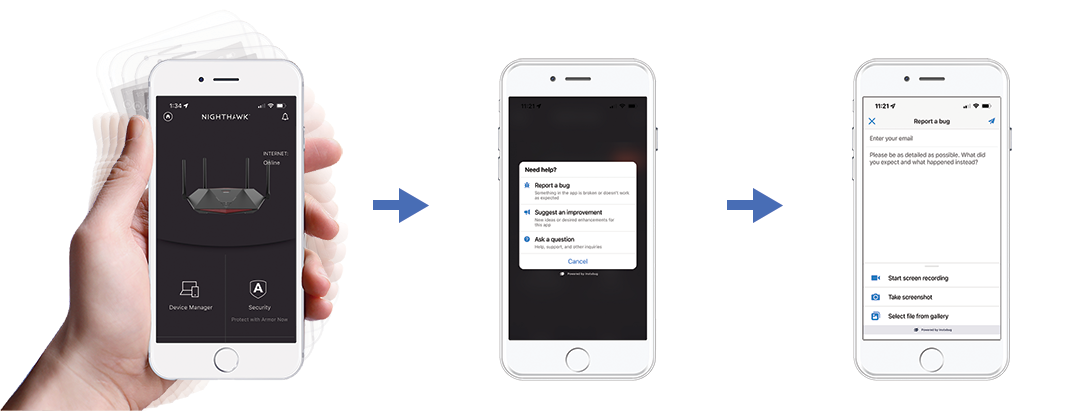
Shake mobile device to trigger Nighthawk app bug report dialog

To submit a bug report or logs from the Nighthawk or Orbi app:

  1. With the Nighthawk or Orbi app open, shake your mobile device up and down.
    The Need help? dialog displays.
  2. Tap Report a bug.
    The Report a bug form displays.
  3. Enter your contact email address in the Enter your email field.
  4. In the main text field, enter as much information as possible about the bug or problem that you experienced.
  5. If you already took a recording or screenshot of the problem, tap Select file from gallery and choose the recording or screenshot to attach.
    Your existing recording or screenshot is attached to your bug report.
  6. (Optional) To take a new screenshot or video, tap Start screen recording or Take screenshot.
    The Nighthawk or Orbi app displays with a Camera or Record button in the lower right corner.
    1. To take a screen recording, tap the Record button, complete the steps to trigger the bug or problem, then tap Stop to save your recording.
    2. To take a screenshot, complete the steps to trigger the bug or problem and tap the Camera icon to save your screenshot.
    Your recording or screenshot is attached to your bug report.
  7. When you are finished entering information and attaching recordings or screenshots to your bug report, tap the Send icon in the top right corner.
    Your bug report is sent.

After your bug report is sent, create a NETGEAR support case that references your bug report to discuss your problem with a representative. If you already created a support case for your problem, let your representative know that you submitted a bug report. For more information, see How do I create a NETGEAR support case?

Last Updated:07/07/2025 | Article ID: 000064839

This article applies to:

Recently Viewed Articles

    Our team is here to help!

    Phone
    Chat
    Email