

Introduction
The WAC510 is a dual-band Wave 2 802.11ac access point that provides high performance and range for small businesses. Its two streams of data (2x2) provide aggregate throughput of up to 1.2 Gbps (400 Mbps at 2.4 GHz and 867 Mbps at 5 GHz).
It also uses multi-user multiple-input and multiple-output (MU-MIMO) technology to avoid congestion and reliably enable maximum performance in high-density sites.
The WAC510 offers two modes of operation: access point mode for large deployments and router mode for deployment of a single WAC510 in a small office.
With all of these great features, the WAC510 is a good fit for a small business such as a doctor’s office, café, or small retail store. This article outlines how the WAC510 works in router mode.
Network topology
When the WAC510 is used in router mode, it is connected to your Internet modem directly. An Ethernet cable connects the yellow wide area network (WAN) PoE port on the WAC510 and an Ethernet port on your modem.
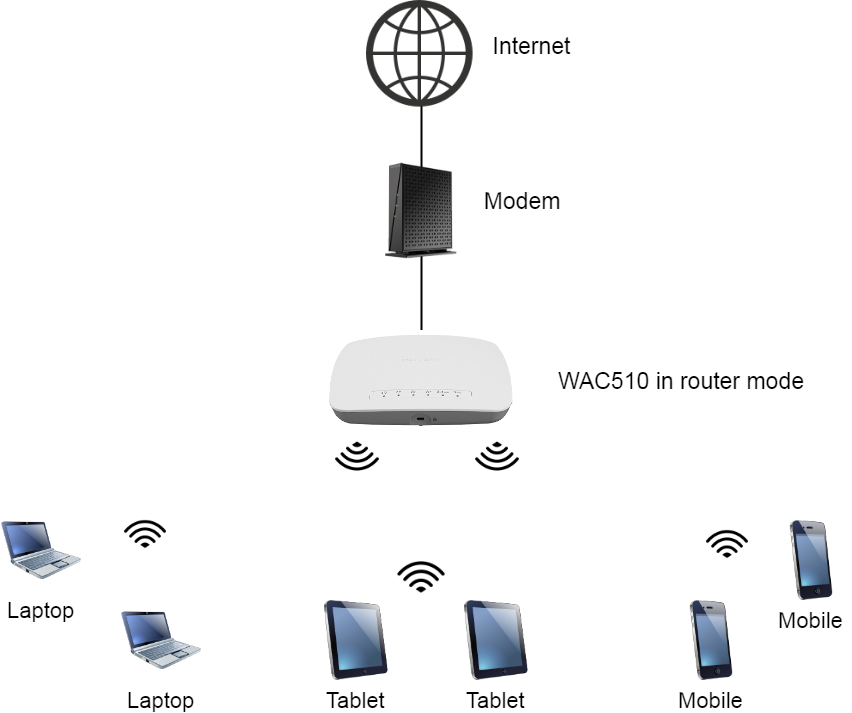
To extend your wired network, you can also connect the LAN port on the WAC510 to a network switch.
Router mode features
Your WAC510 access point has the following features when used in router mode.
Network Address Translation (NAT)
When router mode is enabled on your WAC510, each wired or wireless device in your network has a private IP address. Your WAC510 uses a feature called Network Address Translation (NAT) to allow your connected devices to share one public IP address from your Internet service provider (ISP).
NAT also makes your network more secure, because traffic to and from the Internet now goes through your router's address substitution process. NAT blocks direct access to your private IP addresses.
NAT is automatically enabled when the WAC510 is in router mode.
Dynamic Host Configuration Protocol (DHCP)
Each device that connects to a local area network (LAN) must have an IP address to communicate on the network. For Internet access, each device must also have default gateway and DNS server settings configured.
In router mode, the WAC510 has a built-in Dynamic Host Configuration Protocol (DHCP) server that dynamically assigns IP addresses, a default gateway, and DNS server addresses to all connected devices on the network.
The WAC510 supports up to eight DHCP scopes (the default scope and an additional seven), which is useful when you need to create more than one virtual LAN (VLAN) on your network. For example, you might create one WiFi network (SSID) and VLAN for employees and one SSID and VLAN for guests.
You must use VLANS to take advantage of the additional DHCP scopes.
Virtual LAN (VLAN) support
VLANs provide segregation between groups of client devices. For example, you might want to separate employees’ network traffic from guests’ traffic.
Each VLAN ID corresponds to an SSID. When you create a new SSID, a unique VLAN ID is assigned to it. You can then create a DHCP server scope, assign it that unique VLAN ID, and issue IP addresses from a unique address pool to the client devices in that VLAN.
Inter-VLAN routing
By default, inter-VLAN routing is enabled, so devices on different Wi-Fi networks can communicate with each other. You can choose which VLANs can communicate with each other.
For added security, you can disable inter-VLAN routing so that devices on different VLANs (Wi-Fi networks) cannot communicate with each other.
Extending the network
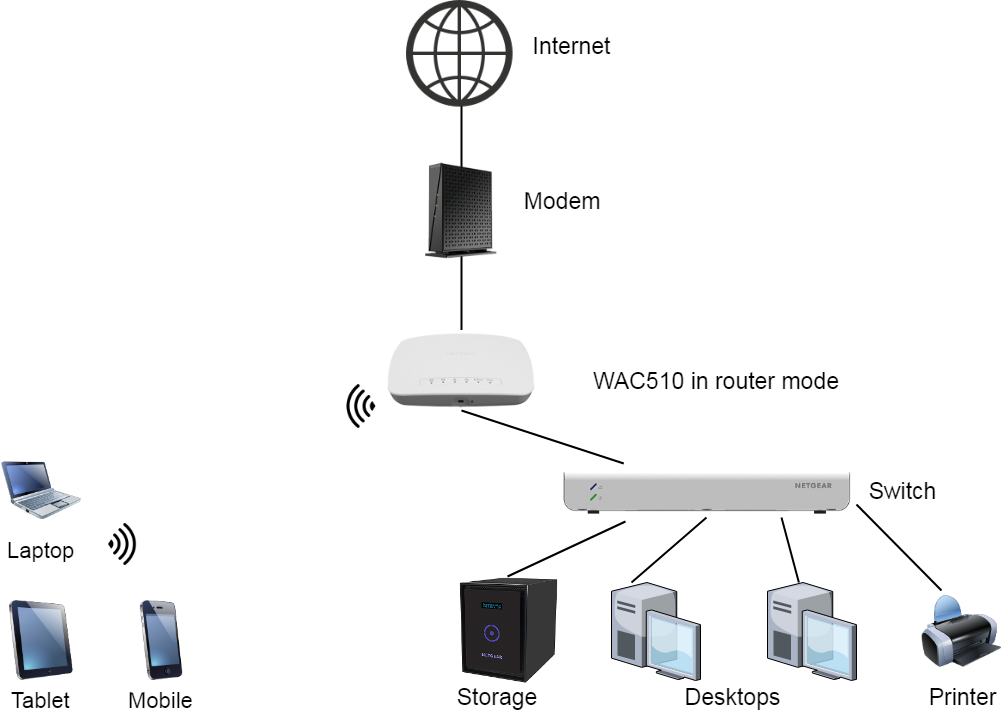
If you need some devices to have a wired connection to your network, you can use the black LAN port on the WAC510. You can connect a single device directly to the WAC510 or connect a network switch so that you can connect multiple wired devices. If you need to connect several wired devices, such as desktop computers, printers, and network storage devices, consider purchasing a NETGEAR Insight Managed Smart Cloud Switch to extend your network and allow easy switch management with NETGEAR Insight.
With this kind of network topology, the WAC510 is functioning as both a router and an access point at the same time.
Additional Information
When you use a WAC510 in router mode, the following conditions apply:
- Your WAC510 cannot be managed in NETGEAR Insight.
- Wireless Distribution System (WDS) also known as bridging, is not supported.
- Your WAC510 must be powered by an external power supply because the PoE port is connected to your modem. The WAC510 uses a 12V 2.5 A power adapter. For more information about power adapters, see Power adapter part numbers for ProSAFE WAC model access points.
For configuration instructions, see How do I configure router mode and router mode features on my NETGEAR WAC510 access point?.