

Network address translation (NAT) is a function that your router or gateway performs to create your network. NAT changes the wide area network (WAN) IP address that your Internet service provider (ISP) assigns you from public to private, which allows multiple devices in your network to share it. NAT also secures your network by blocking direct access to your local IP addresses. For more information, see What is NAT (Network Address Translation)?
Double NAT occurs when you connect your router to an ISP gateway or another router. Because NAT is performed by each router or gateway, your network is split into two different private networks. The devices connected to one private network might have communication problems with the devices connected to the other private network, and you might experience problems with:
- Online games
- VPN connections
- Port forwarding and triggering
- Secure websites that use SSL
The following collapsable sections have diagrams illustrating network configurations that can cause double NAT:
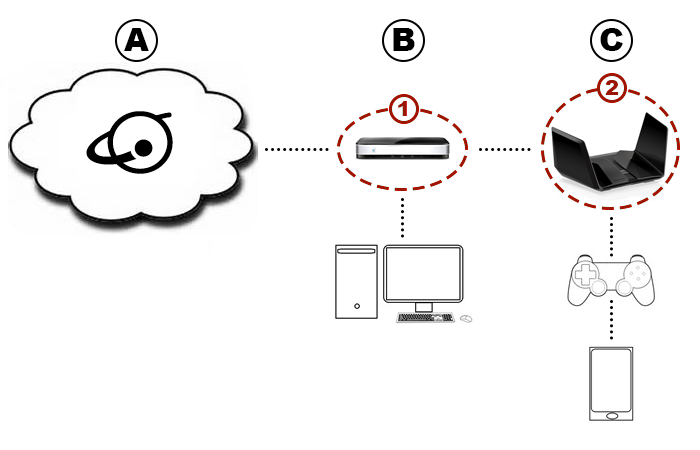
A. Internet
B. ISP Gateway
C. NETGEAR Router
1. Gateway NAT
2. NETGEAR Router NAT
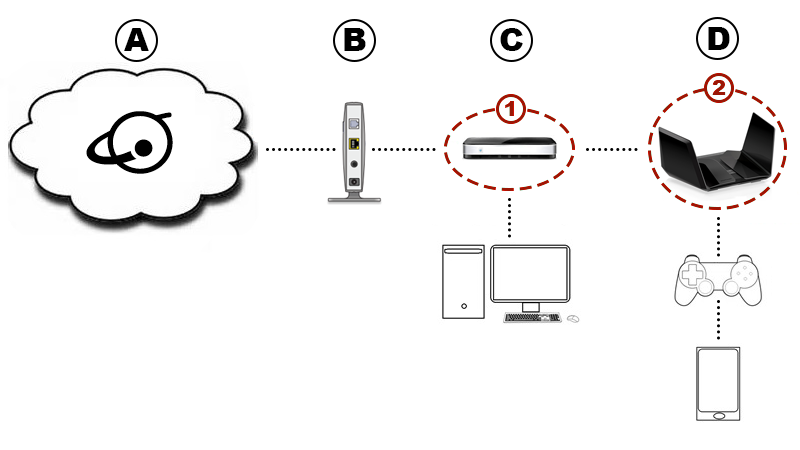
A. Internet
B. Modem
C. Other Router
D. NETGEAR Router
1. Other Router NAT
2. NETGEAR Router NAT
If your network is set up to perform double NAT, you can fix it. For more information, see How do I fix problems caused by my NETGEAR Orbi or Nighthawk router connected to an ISP gateway?