

If your NETGEAR Orbi or Nighthawk router is connected to an Internet service provider (ISP) gateway or another router and you are having network problems, your network might be set up to perform double network address translation (NAT). For more information, see What is double NAT and why is it bad?
NOTE: If you connected another router to your ISP gateway or main router to improve WiFi coverage or add more Ethernet ports to your home network, consider the following solutions:
- To expand WiFi coverage to a specific area: A WiFi extender is a better choice.
- To improve WiFi coverage throughout your entire home: An Orbi WiFi System is ideal.
- To add more Ethernet ports to your network: An unmanaged Ethernet switch is appropriate.
There are multiple ways to fix double NAT issues with your network. Your options depend on whether your Orbi or Nighthawk router is connected to an ISP gateway or to another router. Click the following expandable sections for more information on your particular setup.
To fix network problems with your Orbi or Nighthawk router when it is connected to an ISP gateway:
If your Orbi or Nighthawk router is connected to an ISP gateway, you can resolve double NAT issues by putting your ISP gateway in bridge mode or turning the gateway’s WiFi off and putting your Orbi or Nighthawk router in access point (AP) mode.
We recommend that you put your ISP gateway in bridge mode for best network performance. If you can’t put it in bridge mode, you must turn its WiFi off and put your Orbi or Nighthawk router in AP mode. Some router features are disabled in AP mode.
For more information, see the following articles:
- How do I install my NETGEAR or Orbi router if I use a gateway from my ISP?
- How do I change my NETGEAR router to AP mode?
The following diagrams show a home network with an ISP gateway before and after fixing double NAT:
Before (Not fixed):
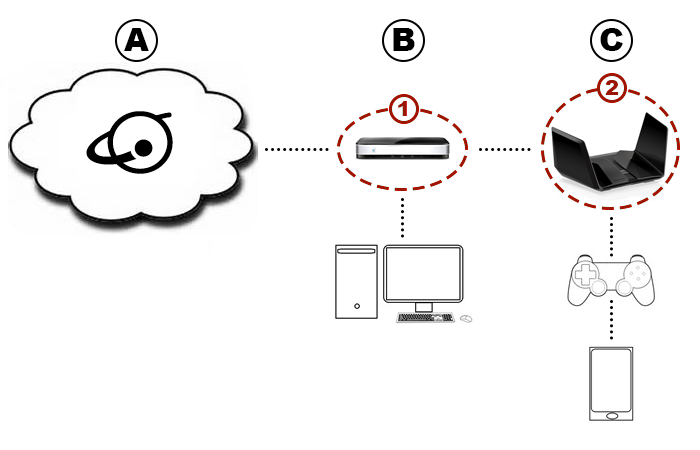
A. Internet
B. ISP Gateway
C. NETGEAR Router
1. Gateway NAT
2. NETGEAR Router NAT
After (Fixed):
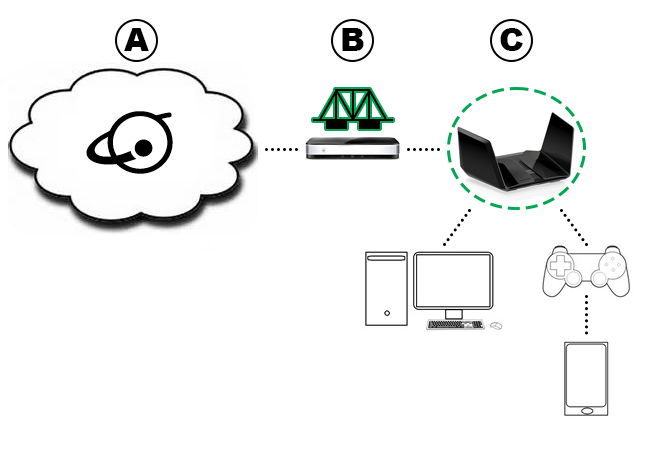
A. Internet
B. ISP Gateway in bridge mode
C. NETGEAR Router
To fix network problems with your Orbi or Nighthawk router when it is connected to another router:
If your Orbi or Nighthawk router is connected to another router, you can resolve double NAT issues by removing the first router from your network, putting the first router in bridge mode, or putting your Orbi or Nighthawk router in access point (AP) mode.
We recommend that you remove the first router for best network performance. If you can’t remove the first router, check its capabilities to see if it supports bridge mode. Most NETGEAR and Orbi routers support bridge mode, but routers from other brands might not. If you can’t remove the first router or put it in bridge mode, you must put your Orbi or Nighthawk router in AP mode. Some router features are disabled in AP mode.
For more information, see the following articles:
- What is wireless bridge mode and how do I set it up on my NETGEAR router?
- How do I change my NETGEAR router to AP mode?
The following diagrams show a home network with multiple routers before and after fixing double NAT:
The following diagrams show a home network with an ISP gateway before and after fixing double NAT:
Before (Not fixed):
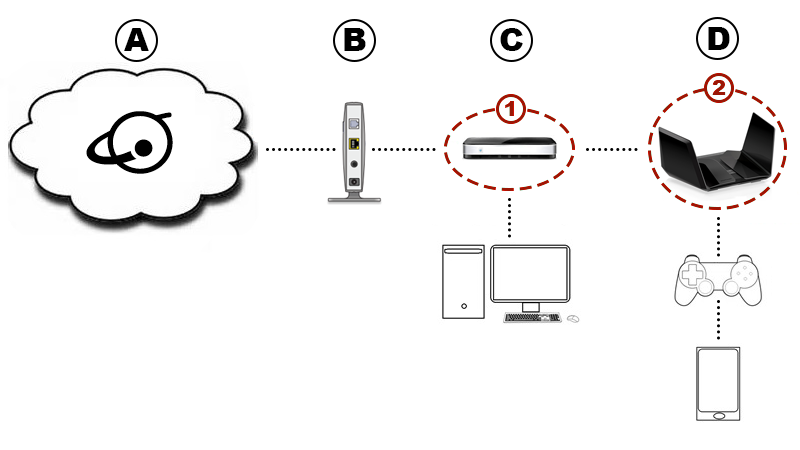
A. Internet
B. Modem
C. Other Router
D. NETGEAR Router
1. Other Router NAT
2. NETGEAR Router NAT
After (Fixed):

A. Internet
B. Modem
C. NETGEAR Router