

NETGEAR non sostituisce CD in caso di perdita o rottura perché il software di gestione incorporato nei router e nei gateway dispone di una procedura di installazione guidata che assolve a questa funzione. Non è necessario eseguire il download di alcun componente in sostituzione di un CD: tutto ciò che occorre è all'interno del router. Ciò vale anche nei seguenti casi:
- Il CD fornito in dotazione con il router è andato perduto o non può essere letto, oppure
- Si sono verificati problemi durante l'esecuzione del programma di configurazione, oppure
- Il router non è collegato a un computer con sistema operativo Windows.
Per accedere alla procedura guidata di installazione e al programma di configurazione sul router:
- Connect your router to a computer by plugging one end of an Ethernet cable into any of the four LAN ports on the back of your router.
- Log in to your NETGEAR router by browsing to
http://192.168.1.1 or http://192.168.0.1 or http://www.routerlogin.net or http://www.routerlogin.com.
Note: The URL changes by the product model. You can sometimes find the login URL and default login information on a sticker on the bottom or back of the router.
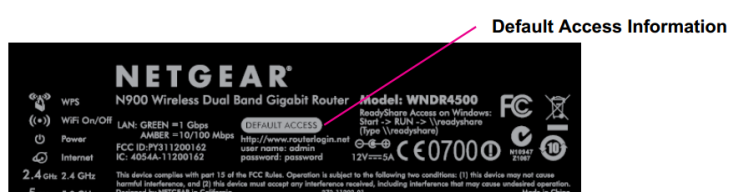
Enter the username (admin) and password. By default, the password is password or 1234 (for older router models) unless it was previously changed. - Per installare il router, basta fare clic sul collegamento "Installazione guidata" nell'angolo in alto a sinistra del menu di navigazione, dopo aver eseguito l'accesso al router.
Aggiornate:10/17/2025
|
ID articolo: 22306