

This article describes the difference between WiFi link rate and actual file transfer, and lists the 802.11 WiFi modes, which each can support a specific maximum WiFi link rate.
The physical layer (PHY) rate is the maximum speed that data can move across a WiFi link between a WiFi client and a WiFi router or access point. User activities such as file transfers and web content browsing happen at the application layer. The rate obtained at the application layer is much lower than the physical layer rate. For example, a link rate of 300 Mbps usually corresponds to 50 to 90 Mbps speed on the TCP/UDP layer.
In the following example, the transfer rate (that is, link rate) is 130 Mbps (see the first figure). However, the corresponding actual file transfer speed is 4.76 MB/s (see the second figure), which translates into 38.1 Mbps.
Lowercase b (as in Mbps) means bit and uppercase B (as in MB/s) means byte. There are 8 bits (b) in each byte (B). This distinction applies to related units of measure. For example, MB/sec is megabytes per second, and Mbps is megabits (millions of bits) per second.
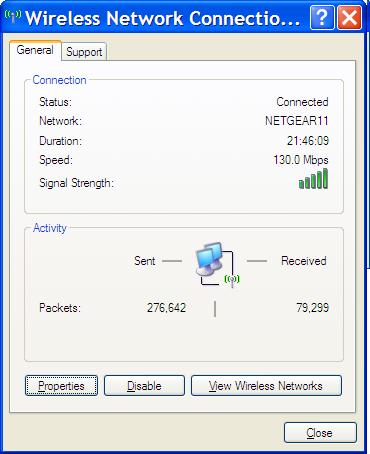
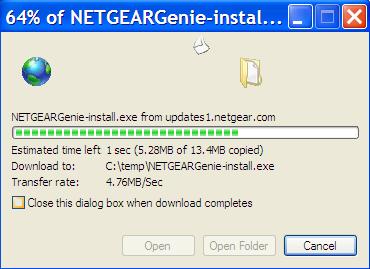
The reasons for this large difference between the link rate and actual rate are:
- High overhead involved in WiFi connections. There are many bits used for communicating background technical information other than the actual data that is sent or received.
- Data retransmission because of the inherent unreliability of a WiFi connection.
Different WiFi clients negotiate different link speeds with the WiFi router or access point, based on the WiFi mode, distance, and noise level (that is, the level of interference from other WiFi transmissions).
WiFi modes:
- 802.11n (WiFi 4): Maximum theoretical transfer rate of 300 Mbps but can reach up to 450 Mbps (when using three antennas). Operates in both the 2.4 GHz and 5 GHz bands.
- 802.11ac (WiFi 5): Maximum theoretical transfer rate of 1300 Mbps, but actual speed often considerably lower. Operates in the 5 GHz band only. Features that were developed later increased the maximum theoretical transfer rate to 3.5 Gbps.
- 802.11ax (WiFi 6): Maximum theoretical transfer rate of 9.6 Gbps. Operates in both the 2.4 GHz and 5 GHz bands. Supports much better bandwidth and user management than previous WiFi modes. Requires WPA3 security.
- 802.11ax (WiFi 6E): WiFi 6E is an extension (E) of WiFi 6. The maximum theoretical transfer rate is still 9.6 Gbps, but WiFi 6E offers better bandwidth and user management and a lower latency than WiFi 6. Operates in both the 2.4 GHz and 5 GHz bands and introduces the 6 GHz band. Requires WPA3 security.
- 802.11be (WiFi 7): Maximum theoretical transfer rate of 23 Gbps. Operates in the 2.4 GHz, 5 GHz, and 6 GHz bands. Compared to WiFi 6E, WiFi 7 further improves the bandwidth and user management, offers an even lower latency, and introduces multi-link operation. Requires WPA3 security.
(This list excludes the legacy 802.11a, 802.11b, and 802.11g modes.)
The link rate is directly related to WiFi signal strength. The signal strength is at its maximum (100% or close to 100%) when the WiFi client is close to the WiFi router or access point. In this situation, the client gets the optimal link rate. As the WiFi client moves further away, its signal strength is reduced, and the link rate goes down. Eventually, moving too far away, no connection is possible.
If a WiFi client constantly gets a low signal strength and you cannot move the client closer to the WiFi router or access point, consider purchasing a NETGEAR WiFi extender, a more powerful NETGEAR WiFi router or access point, or a NETGEAR Mesh WiFi System.