

Here we will show you how to configure DHCP option 43 on a Windows Server used to specify the IP address of a wireless controller. This applies to all current Windows Server versions. We will assume that standard DHCP settings are configured and DHCP server is operational.
-
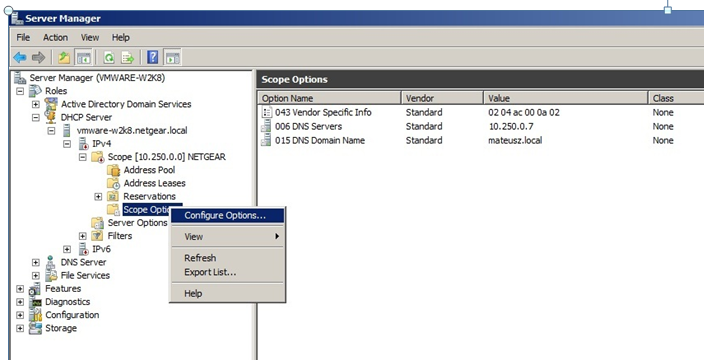
Go to scope options of defined DHCP pool.
-
Select “Scope Options” to configure new option.
-
Select option 43 for editing.
-
Enter hexadecimal value representing the vendor code and management IP address of wireless controller
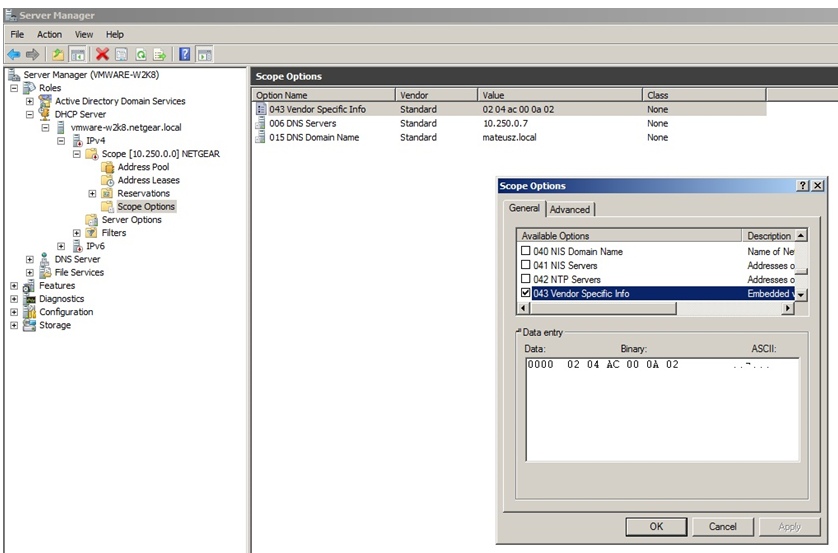
Vendor prefix for NETGEAR in this example is 02 04
Hexadecimal value for controller with IP address of 172.0.10.2 (decimal ) is ac 00 0a 02
The combined value, vendor prefix and IP will be 02 04 ac 00 0a 02
To convert an IP address to hexidecimal format you can use an online calculator. An example of one can be found here (link valid at time of creation)