

To configure client access to a LUN group:
1. Select SAN.
The SAN screen displays:
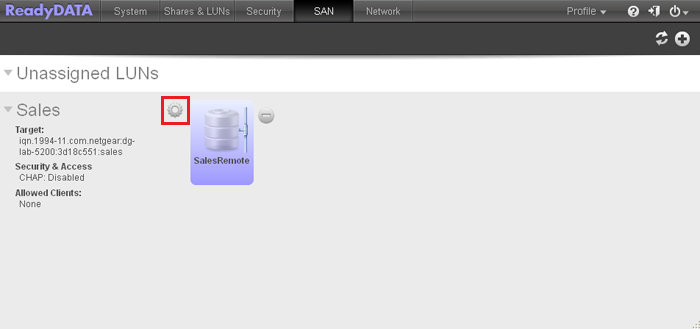
2. Click the gear icon to the right of the LUN group.
A pop-up menu displays:
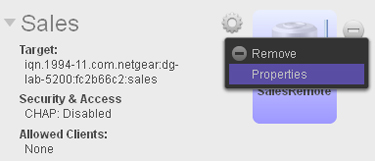
3. Select Properties.
The LUN Group Properties pop-up screen displays (the following figure shows examples):
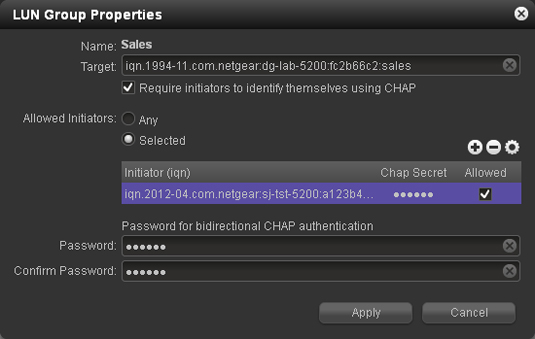
4. Configure the properties as explained in the following table:
|
Item |
Description |
|
|
Name |
The name is provided for information only and cannot be changed. |
|
|
Target |
The target is the address that an iSCSI client (that is, an initiator) needs to access the LUN group. The Target field is automatically populated, but you can delete the content by clicking the cross at the right of the field and then replace the content with a custom target address. |
|
|
|
Require initiators to identify themselves using CHAP |
By default, access to the LUN group is open to the initiators that you add to the table onscreen. Select this check box to enable CHAP authentication, and to allow only authenticated initiators access to the LUN group. |
|
Allowed Initiators |
Select one of the following radio buttons:
To add an IQN to the table and allow access to the LUN group:
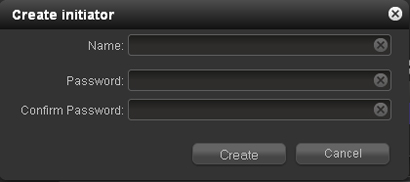
1. Click the + button to the right of the empty table. The Create initiator pop-up screen displays:
|
|
|
Allowed Initiators (continued) |
2. In the Name field, enter an IQN in the format as defined by RFC3720. For example, iqn.2012-04.com.netgear:sj-tst-5200:a123b456. 3. Enter a CHAP password with a length of at least 12 characters. 4. Confirm the CHAP password. 5. Click Create. The IQN is added to the table on the LUN Group Properties pop-up screen. 6. In the Allowed column of the table, select (that is, flag) the check box to allow the initiator access to the LUN group.
1. Select the IQN by clicking it in the table. 2. Click the - button. 3. Confirm the removal.
1. Select the IQN by clicking it in the table. 2. Click the wheel button. 3. Make the password changes 4. Click Apply. |
|
|
Password for bidirectional CHAP authentication |
By default, access to an initiator by a LUN in the LUN group is open. To require a LUN in the LUN group to be authenticated before accessing an initiator, set a password for bidirectional CHAP authentication. |
|
|
Password |
Enter a CHAP password with a length of at least 12 characters. |
|
|
Confirm Password |
Confirm the CHAP password. |
|
5. Click Apply.
The new LUN group properties take effect immediately.
For information about how to set up and access a LUN from a client device, see the How can I use an iSCSI-attached device to access LUN groups on my ReadyDATA storage system?