

Use the Power icon at the top right corner of the local admin page to gracefully shut down or restart the ReadyNAS.
To gracefully shut down or restart the system:
1. Select System > Overview.
2. Click the Power icon ( ) next to the image of your system.
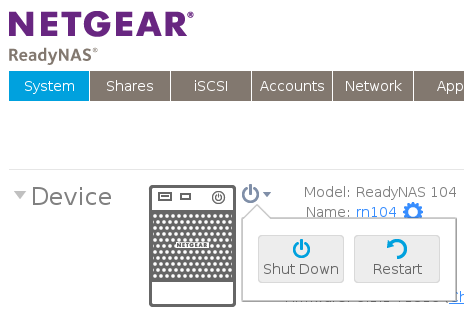
3. From the drop-down menu that displays, select one of the following options:
-
Shut down. Gracefully power down the system.
-
Restart. Gracefully power down the system and restart it.
3. Confirm your selection.
If you enabled email alerts, the ReadyNAS sends a message after it restarts.
Last Updated:07/07/2025
|
Article ID: 23117