

The ReadyDATA 5200, EDA2000, and EDA4000 come with a front bezel that protects the drive bays with a lockable cover. You can operate these systems with or without the bezel.
To install the front bezel
1. Hold the bezel in front of the ReadyDATA 5200, EDA2000, or EDA4000 chassis.
Ensure that the bezel is parallel to the chassis.
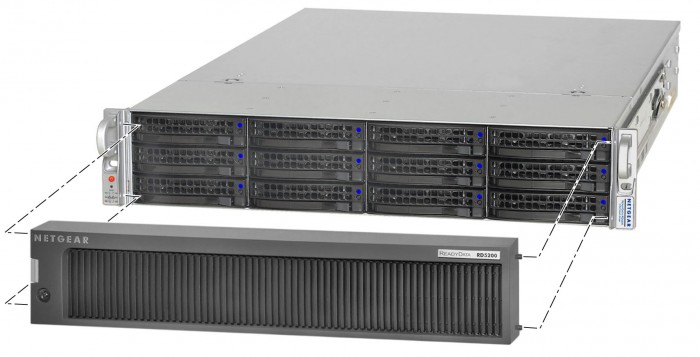
2. Insert the tabs on the right side of the bezel into the holes on the right bezel brace.
3. Push the bezel to the right and insert the tabs on the left side of the bezel into the holes on the left bezel brace.
The bezel snaps into place.
4. (Optional) Lock the bezel.
To remove the front bezel:
1. If the bezel is locked, unlock it.
2. Push the release latch on the left side of the bezel.
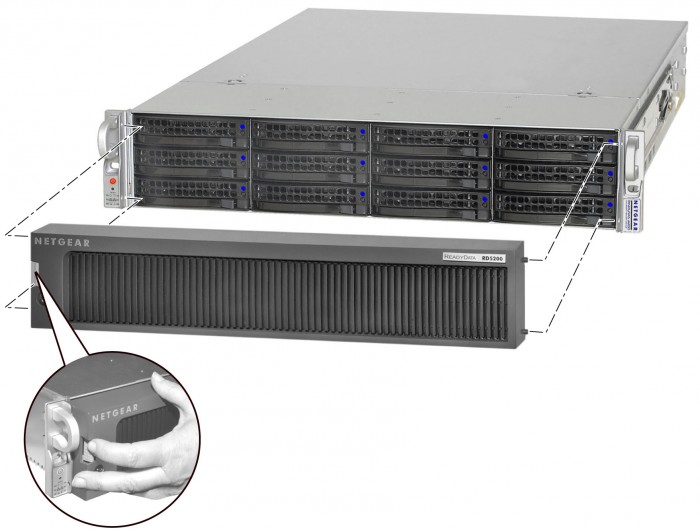
3. Pull the bezel toward you.
Last Updated:07/07/2025
|
Article ID: 23041