

A switch stack is a set of up to 8 switches connected through their stacking ports. The switch that controls the operation of the stack is the stack master. For more information see the What is a stack master and how does it work with my managed switch?
The stack master and the other switches in the stack are stack members. Stack members use stacking technology to behave and work together as a unified system. Layer 2 and Layer 3 protocols present the entire switch stack as a single entity to the network. For more information see the Wha are stack members and how do they work with my managed switch?
The following figure shows an example of switches that are interconnected to form a stack.
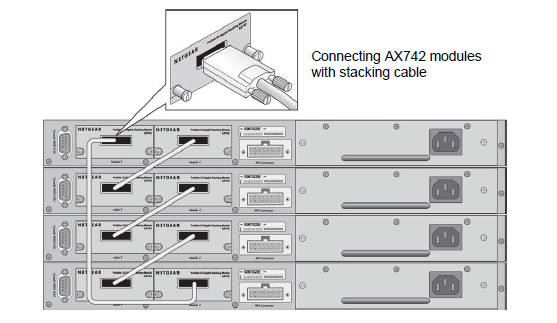
For more information, see the following support articles:
- How do I use connectivity to manage the switch stack on my managed switch?
- What are stack member numbers and how do they work with my managed switch?
- What are stack member priority values and how do they work with my managed switch?
This article applies to the following managed switches and their respective firmware:
- M5300 - firmware version 10.0.0.x
-
- M5300-28G (GSM7228S)
- M5300-5G (GSM7252S)
- M5300-28G3 (GSM7328Sv2h2)
- M5300-52G3 (GSM7352Sv2h2)
- M5300-28G_POE+ (GSM7228PSv1h2)
- M5300-52G-POE+ (GSM7252PSv1h2)
- M5300-28GF3 (GSM7328FSv2)
- XSM7224S - firmware version 9.0.1.x