

In this article, dot1x is enabled on all the ports so that all the hosts that are authorized are assigned to VLAN 1. On ports 1/0/1 and 1/0/24, guest VLAN is enabled. If guests connect to the port, they are assigned to VLAN 2000, so that guests cannot access the internal VLAN, but can access each other in the guest VLAN.
- Enter the following commands:
(Netgear Switch) #vlan database

	(Netgear Switch) (Vlan)#vlan 2000

	(Netgear Switch) (Vlan)#exit

	(Netgear Switch) (Config)#interface 1/0/1

	(Netgear Switch) (Interface 1/0/1)#vlan participation include 2000

	(Netgear Switch) (Interface 1/0/1)#exit

	(Netgear Switch) (Config)#interface 1/0/24

	(Netgear Switch) (Interface 1/0/24)#vlan participation include 2000

	(Netgear Switch) (Interface 1/0/24)#exit
- Create VLAN 2000, and have 1/0/1 and 1/0/24 as members of VLAN 2000.
(Netgear Switch) (Config)#aaa authentication dot1x default radius

	(Netgear Switch) (Config)#dot1x system-auth-control

	(Netgear Switch) (Config)#radius server host auth 192.168.0.1

	(Netgear Switch) (Config)#radius server key auth 192.168.0.1

	Enter secret (16 characters max):12345

	Re-enter secret:12345

	(Netgear Switch) (Config)#interface 1/0/6

	(Netgear Switch) (Interface 1/0/6)#dot1x port-control force-authorized

	(Netgear Switch) (Interface 1/0/6)#exit

	(Netgear Switch) (Config)#interface 1/0/12

	(Netgear Switch) (Interface 1/0/12)#dot1x port-control force-authorized

	(Netgear Switch) (Interface 1/0/12)#exit
- Enable dot1x and RADIUS on the switch.
(Netgear Switch) (Config)#interface 1/0/1

	(Netgear Switch) (Interface 1/0/1)#dot1x guest-vlan 2000

	(Netgear Switch) (Interface 1/0/1)#exit

	(Netgear Switch) (Config)#interface 1/0/24

	(Netgear Switch) (Interface 1/0/24)#dot1x guest-vlan 2000

	(Netgear Switch) (Interface 1/0/24)#exit
- Enable the guest VLAN on ports 1/0/1 and 1/0/24.
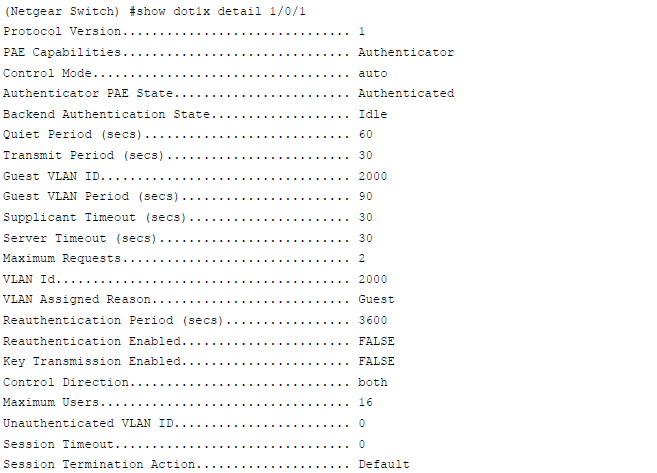
For more information, see the following support article:
- What is the guest VLAN feature and how does it work with my managed switch?
- How do I create a guest VLAN using the web interface on my managed switch?
This article applies to the following managed switches and their respective firmware:
- M5300 - firmware version 10.0.0.x
-
- M5300-28G (GSM7228S)
- M5300-5G (GSM7252S)
- M5300-28G3 (GSM7328Sv2h2)
- M5300-52G3 (GSM7352Sv2h2)
- M5300-28G_POE+ (GSM7228PSv1h2)
- M5300-52G-POE+ (GSM7252PSv1h2)
- M5300-28GF3 (GSM7328FSv2)
- M4100 - firmware version 10.0.1.x
-
- M4100-26G (GSM7224v2h2)
- M4100-50G (GSM7248v2h2)
- M4100-26G-POE (GSM7226Pv1h1)
- M4100-50G-POE+ (GSM7248Pv1h1)
- M4100-26G-POE (FSM7226Pv1h1)
- M4100-50-POE (FSM7250Pv1h1)
- M4100-D12G (GSM5212v1h1)
- M4100-D10-POE (FSM5210Pv1h1)
- M7100 - firmware version 10.0.1.x
-
- M7100-24X (XSM7224)
- XSM7224S - firmware version 9.0.1.x
Last Updated:07/07/2025
|
Article ID: 21803