

- Create MAC ACL 101 on the switch.
- Select Security > ACL > MAC ACL.
A screen similar to the following displays.
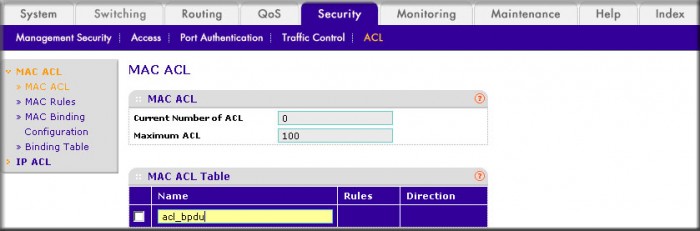
- In the Name field, enter acl_bpdu.
- Click Add to create ACL acl_bpdu.
- Select Security > ACL > MAC ACL.
- Create a new rule associated with the ACL acl_bpdu.
- Select Security > ACL > MAC ACL > MAC Rules.
A screen similar to the following displays.
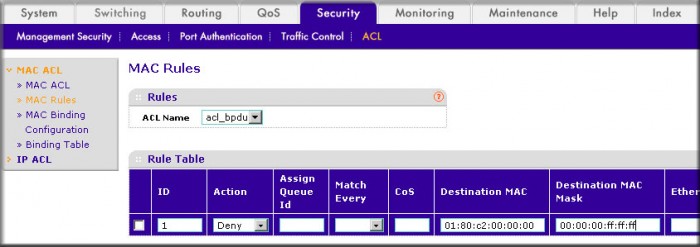
- In the ACL Name field, select acl_bpdu.
- In the Action field, select Deny.
- Enter the following information in the Rule Table.
- In the ID field, enter 1.
- In the Destination MAC field, enter 01:80:c2:00:00:00.
- In the Destination MAC Mask field, enter 00:00:00:ff:ff:ff.
- Click the Add button.
- Select Security > ACL > MAC ACL > MAC Rules.
- Create a another rule associated with the ACL acl_bpdu.
- Select Security > ACL > MAC ACL > MAC Rules.
A screen similar to the following displays.
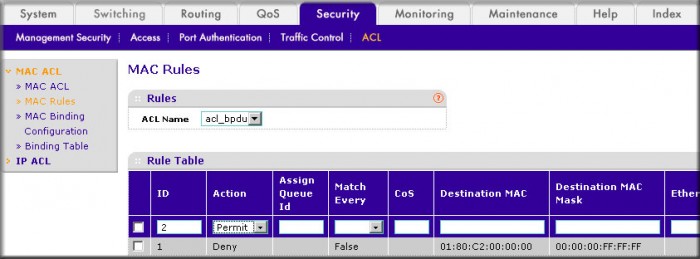
- Select acl_bpdu in the ACL Name field.
- Enter the following information in the Rule Table.
- In the ID field, enter 2.
- In the Action field, select the Permit.
- Click the Add button.
- Select Security > ACL > MAC ACL > MAC Rules.
- Apply the ACL acl_bpdu to port 2.
- Select Security > ACL > MAC ACL > MAC Binding Configuration.
A screen similar to the following displays.
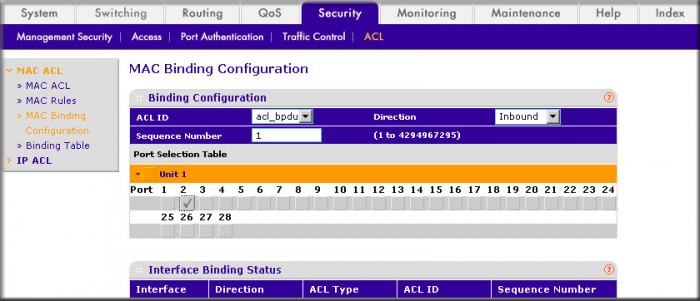
- Enter the following information in the MAC Binding Configuration.
- In the ACL ID field, select acl_bpdu.
- In the Sequence Number field, enter 1.
- Click the Unit 1.
The ports display.
- Click the gray box under port 2.
A check mark displays in the box.
- Click Apply to save the settings.
- Select Security > ACL > MAC ACL > MAC Binding Configuration.
For more information, see the folloawing support articles:
- What are Access Control Lists (ACLs) and how do they work with my managed switch?
- How do I set up a MAC Access Control List (ACL) with two rules using CLI commands on my managed switch?
This article applies to the following managed switches and their respective firmware:
- M5300 - firmware version 10.0.0.x
-
- M5300-28G (GSM7228S)
- M5300-5G (GSM7252S)
- M5300-28G3 (GSM7328Sv2h2)
- M5300-52G3 (GSM7352Sv2h2)
- M5300-28G_POE+ (GSM7228PSv1h2)
- M5300-52G-POE+ (GSM7252PSv1h2)
- M5300-28GF3 (GSM7328FSv2)
- M4100 - firmware version 10.0.1.x
-
- M4100-26G (GSM7224v2h2)
- M4100-50G (GSM7248v2h2)
- M4100-26G-POE (GSM7226Pv1h1)
- M4100-50G-POE+ (GSM7248Pv1h1)
- M4100-26G-POE (FSM7226Pv1h1)
- M4100-50-POE (FSM7250Pv1h1)
- M4100-D12G (GSM5212v1h1)
- M4100-D10-POE (FSM5210Pv1h1)
- M7100 - firmware version 10.0.1.x
-
- M7100-24X (XSM7224)
- XSM7224S - firmware version 9.0.1.x
Last Updated:07/07/2025
|
Article ID: 21722