

This example shows how to isolate VLANs on a Layer 3 switch by using ACLs. In this example, PC 1 is in VLAN 24, PC 2 is in VLAN 48, and the server is in VLAN 38. PC 1 and PC 2 are isolated by an ACL but can both access the server.
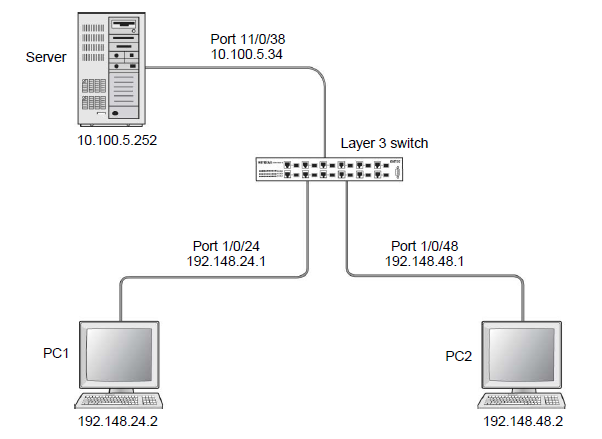
- Enter the following CLI commands.
(Netgear Switch) #vlan database

	(Netgear Switch) (Vlan)#vlan 24

	(Netgear Switch) (Vlan)#vlan routing 24

	(Netgear Switch) (Vlan)#exit

	(Netgear Switch) #config

	(Netgear Switch) (Config)#interface 1/0/24

	(Netgear Switch) (Interface 1/0/24)#vlan participation include 24

	(Netgear Switch) (Interface 1/0/24)#vlan pvid 24

	(Netgear Switch) (Interface 1/0/24)#exit

	(Netgear Switch) (Config)#interface vlan 24

	(Netgear Switch) (Interface-vlan 24)#routing

	(Netgear Switch) (Interface-vlan 24)#ip address 192.168.24.1 255.255.255.0

	(Netgear Switch) (Interface-vlan 24)#exit

	(Netgear Switch) (Config)#exit
- Create VLAN 48, add port 1/0/48 to it, and assign IP address 192.168.48.1 to it.
(Netgear Switch) #vlan database

	(Netgear Switch) (Vlan)#vlan 48

	(Netgear Switch) (Vlan)#vlan routing 48

	(Netgear Switch) (Vlan)#exit

	(Netgear Switch) #config

	(Netgear Switch) (Config)#interface 1/0/48

	(Netgear Switch) (Interface 1/0/48)#vlan participation include 48

	(Netgear Switch) (Interface 1/0/48)#vlan pvid 48

	(Netgear Switch) (Interface 1/0/48)#exit


	(Netgear Switch) (Config)#vlan interface vlan 48

	(Netgear Switch) (Interface-vlan 48)#routing

	(Netgear Switch) (Interface-vlan 48)#ip address 192.168.48.1 255.255.255.0

	(Netgear Switch) (Interface-vlan 48)#exit

	(Netgear Switch) (Config)#exit
- Create VLAN 38, add port 1/0/38 to it, and assign IP address 10.100.5.34 to it.
(Netgear Switch) #vlan database

	(Netgear Switch) (Vlan)#vlan 38

	(Netgear Switch) (Vlan)#vlan routing

	(Netgear Switch) (Vlan)#exit

	(Netgear Switch) #config

	(Netgear Switch) (Config)#interface 1/0/38

	(Netgear Switch) (Interface 1/0/38)#vlan participation include 38

	(Netgear Switch) (Interface 1/0/38)#vlan pvid 38

	(Netgear Switch) (Interface 1/0/38)#exit

	(Netgear Switch) (Config)#interface vlan 38

	(Netgear Switch) (Interface-vlan 38)#routing

	(Netgear Switch) (Interface-vlan 38)#ip address 10.100.5.34 255.255.255.0

	(Netgear Switch) (Interface-vlan 38)#exit
- Enable IP routing on the switch.
(Netgear Switch) (Config)#ip routing
- Add a default route so that all the traffic without a destination is forwarded according to this default route.
(Netgear Switch) (Config)#ip route default 10.100.5.252
- Create ACL 101 to deny all traffic that has the destination IP address 192.168.24.0/24.
(Netgear Switch) (Config)#access-list 101 deny ip any 192.168.24.0 0.0.0.255
- Create ACL 102 to deny all traffic that has the destination IP address 192.168.48.0/24.
(Netgear Switch) (Config)#access-list 102 deny ip any 192.168.48.0 0.0.0.255
- Create ACL 103 to permit all other traffic.
(Netgear Switch) (Config)#access-list 103 permit ip any any
- Deny all traffic with the destination IP address 192.168.48.0/24, and permit all other traffic.
(Netgear Switch) (Config)#interface 1/0/24

	(Netgear Switch) (Interface 1/0/24)#ip access-group 102 in 1

	(Netgear Switch) (Interface 1/0/24)#ip access-group 103 in 2

	(Netgear Switch) (Interface 1/0/24)#exit
- Deny all traffic with the destination IP address 192.168.24.0/24, and permit all other traffic.
(Netgear Switch) (Config)#interface 1/0/48

	(Netgear Switch) (Interface 1/0/48)#ip access-group 101 in 1

	(Netgear Switch) (Interface 1/0/48)#ip access-group 103 in 2

	(Netgear Switch) (Interface 1/0/48)#exit
For more information, see the following support articles:
- What are Access Control Lists (ACLs) and how do they work with my managed switch?
- How do use the web interface on my managed switch to configure one-way access using a TCP Flag in Access Control List (ACL)?
This article applies to the following managed switches and their respective firmware:
- M5300 - firmware version 10.0.0.x
-
- M5300-28G (GSM7228S)
- M5300-5G (GSM7252S)
- M5300-28G3 (GSM7328Sv2h2)
- M5300-52G3 (GSM7352Sv2h2)
- M5300-28G_POE+ (GSM7228PSv1h2)
- M5300-52G-POE+ (GSM7252PSv1h2)
- M5300-28GF3 (GSM7328FSv2)
- M4100 - firmware version 10.0.1.x
-
- M4100-26G (GSM7224v2h2)
- M4100-50G (GSM7248v2h2)
- M4100-26G-POE (GSM7226Pv1h1)
- M4100-50G-POE+ (GSM7248Pv1h1)
- M4100-26G-POE (FSM7226Pv1h1)
- M4100-50-POE (FSM7250Pv1h1)
- M4100-D12G (GSM5212v1h1)
- M4100-D10-POE (FSM5210Pv1h1)
- M7100 - firmware version 10.0.1.x
-
- M7100-24X (XSM7224)
- XSM7224S - firmware version 9.0.1.x
Last Updated:07/07/2025
|
Article ID: 21719