

The following script shows the commands you would use to configure a managed switch to provide the port routing support shown in the figure below.
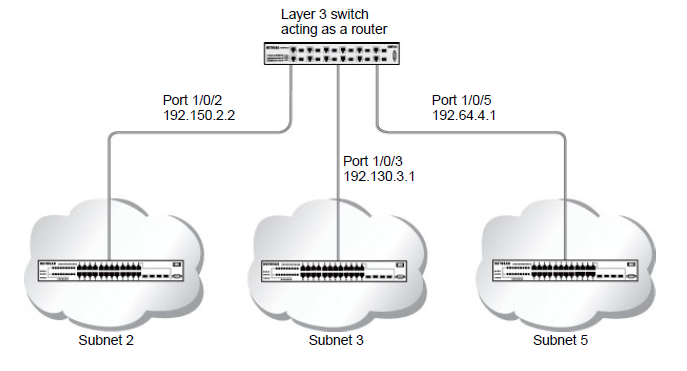
Use the following command to enable routing for the switch. Execution of the command enables IP forwarding by default.
(Netgear Switch) #config

(Netgear Switch) (Config)#ip routing

(Netgear Switch) (Config)#exit
For more information, see the following support articles:
- What does a typical newtwork that includes a managed switch configured for port routing look like?
- How do I enable routing for my managed switch using the web interface?
- What is a Routing Information Protocol (RIP) and how does it work with my managed switch?
This article applies to the following managed switches and their respective firmware:
- M5300 - firmware version 10.0.0.x
-
- M5300-28G (GSM7228S)
- M5300-5G (GSM7252S)
- M5300-28G3 (GSM7328Sv2h2)
- M5300-52G3 (GSM7352Sv2h2)
- M5300-28G_POE+ (GSM7228PSv1h2)
- M5300-52G-POE+ (GSM7252PSv1h2)
- M5300-28GF3 (GSM7328FSv2)
- M4100 - firmware version 10.0.1.x
-
- M4100-26G (GSM7224v2h2)
- M4100-50G (GSM7248v2h2)
- M4100-26G-POE (GSM7226Pv1h1)
- M4100-50G-POE+ (GSM7248Pv1h1)
- M4100-26G-POE (FSM7226Pv1h1)
- M4100-50-POE (FSM7250Pv1h1)
- M4100-D12G (GSM5212v1h1)
- M4100-D10-POE (FSM5210Pv1h1)
- M7100 - firmware version 10.0.1.x
-
- M7100-24X (XSM7224)
- XSM7224S - firmware version 9.0.1.x
Last Updated:07/07/2025
|
Article ID: 21638