

Link aggregation lets a switch treat multiple physical links between two endpoints as a single logical link. All the physical links in a Link Aggregation Group (LAG) must operate in full-duplex mode at the same speed. You can use a LAG to directly connect two switches when the traffic between them requires high bandwidth and reliability, or to provide a higher-bandwidth connection to a public network. Management functions treat a LAG as if it were a single physical port. You can include a LAG in a VLAN. You can configure more than one LAG for on a switch.
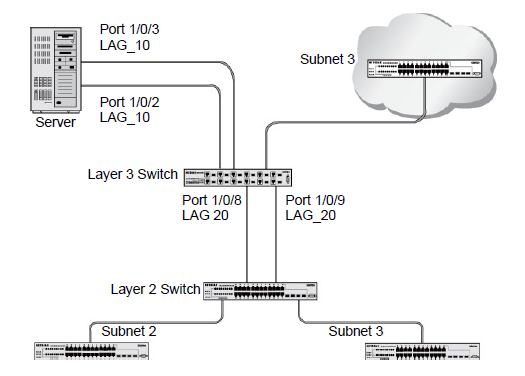
In the previous figure, ports 1/0/3 and 1/0/2 form LAG 10 between the server and the Layer 3 switch. Ports 1/0/8 and 1/0/9 form LAG 20 between the Layer 3 switch and the Layer 2 switch.
LAGs offer the following benefits:
- Increased reliability and availability: If one of the physical links in the LAG goes down, traffic is dynamically and transparently reassigned to one of the other physical links.
- Better use of physical resources: Traffic can be load-balanced across the physical links.
- Increased bandwidth: The aggregated physical links deliver higher bandwidth than each individual link.
- Incremental increase in bandwidth: A physical upgrade could produce a tenfold increase in bandwidth; A LAG produces a two- or five-fold increase, useful if only a small increase is needed.
-