

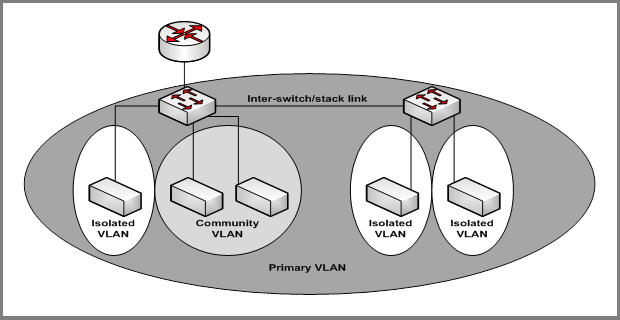
The Private VLANs feature separates a regular VLAN domain into two or more subdomains. Each subdomain is defined (represented) by a primary VLAN and a secondary VLAN. The primary VLAN ID is the same for all subdomains that belong to a private VLAN. The secondary VLAN ID differentiates subdomains from each other and provides Layer 2 isolation between ports of the same private VLAN.
There are three types of VLAN within a private VLAN:
- Primary VLAN - it forwards the traffic from the promiscuous ports to isolated ports, community ports and other promiscuous ports in the same private VLAN. Only one primary VLAN can be configured per private VLAN. All ports within a private VLAN share the same primary VLAN.
- Community VLAN - is a secondary VLAN. It forwards traffic between ports which belong to the same community and to the promiscuous ports. There can be multiple community VLANs per private VLAN.
- Isolated VLAN - is a secondary VLAN. It carries traffic from isolated ports to promiscuous ports. Only one isolated VLAN can be configured per private VLAN.
There are three types of port designation within a private VLAN:
- Promiscuous port - belongs to a primary VLAN and can communicate with all interfaces in the private VLAN, including other promiscuous ports, community ports and isolated ports.
- Community ports - These ports can communicate with other community ports and promiscuous ports.
- Isolated ports - These can ONLY communicate with promiscuous ports.
The Private VLANs can be extended across multiple switches through inter-switch/stack links that transport primary, community and isolated VLANs between devices. See the figure below.
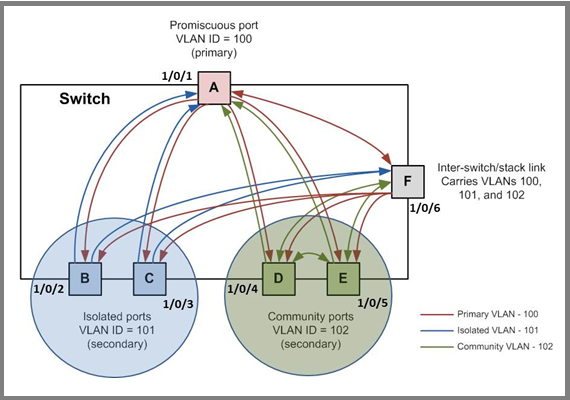
The figure below illustrates the private VLAN traffic flow. Five ports A, B, C, D, and E make up a private VLAN. Port A is a promiscuous port which is associated with the primary VLAN 100. Ports B and C are the host ports which belong to the isolated VLAN 101. Ports D and E are the community ports which are associated with community VLAN 102. Port F is the inter-switch/stack link. It is configured to transmit VLANs 100, 101 and 102. Colored arrows represent possible packet flow paths in the private VLAN domain.
For more information, see the following support articles:
- What is a virtual LAN (VLAN) and how does it work with my managed switch?
- How do I assign private-VLAN type (Primary, Isolated, Community) using the web interface on my managed switch?
This article applies to the following managed switches and their respective firmware:
- M5300 - firmware version 10.0.0.x
-
- M5300-28G (GSM7228S)
- M5300-5G (GSM7252S)
- M5300-28G3 (GSM7328Sv2h2)
- M5300-52G3 (GSM7352Sv2h2)
- M5300-28G_POE+ (GSM7228PSv1h2)
- M5300-52G-POE+ (GSM7252PSv1h2)
- M5300-28GF3 (GSM7328FSv2)
- M4100 - firmware version 10.0.1.x
-
- M4100-26G (GSM7224v2h2)
- M4100-50G (GSM7248v2h2)
- M4100-26G-POE (GSM7226Pv1h1)
- M4100-50G-POE+ (GSM7248Pv1h1)
- M4100-26G-POE (FSM7226Pv1h1)
- M4100-50-POE (FSM7250Pv1h1)
- M4100-D12G (GSM5212v1h1)
- M4100-D10-POE (FSM5210Pv1h1)
- M7100 - firmware version 10.0.1.x
-
- M7100-24X (XSM7224)