

This article provides basic troubleshooting steps and information that will help isolate problems with most NETGEAR powerline adapters, such as:
- powerline adapter not detected
- powerline adapter not finding the other adapters
- powerline adapter not working
To troubleshoot powerline adapters:
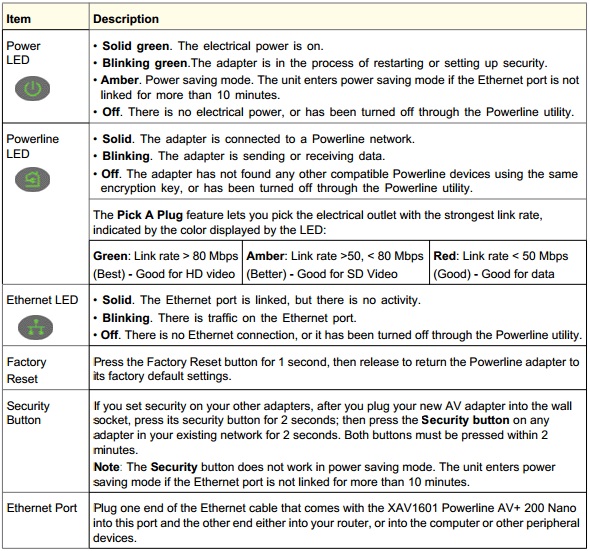
- Always check the status of the LED lights of the adapters.
Note: Some older powerline adapters do not have a reset button nor a security button.
-
Here are some steps to identify the problem based on LED status.

-
If you are adding new adapters to an existing and working powerline network, make sure that they are compatible so that the new adapters will be added successfully. Please check the NETGEAR website for the compatibility list. The list should be seen on the Product Specs tab.
Note: Compatibility of the adapters is based on its HomePlug version. HomePlug AV powerline networks can exist in the same household as a HomePlug 1.0 powerline network, but they cannot communicate with each other.

- Here are some additional troubleshooting steps/information about NETGEAR Powerline adapters:
- Powerline products works better when plugged into a wall outlet without power strips, extension cords, surge protectors, or uninterruptable power supplies. (However, Some surge protectors now have a Powerline Compliant Outlet ("PLC") that allows a powerline adapter to pass along its data. Nevertheless, performance is always better when the powerline adapter is plugged directly into a wall socket.)
- Powerline is “Plug and Play” and should therefore work without any additional setup if requirements are met. (Some powerline adapters also serve as a wireless AP which may need configuration based on customer’s needs.)
- Depending on your Powerline model, you can connect from 15 to 64 nodes.
- Powerline products have both a network password, and a device password. A particular device's password, which is not changable, is printed on the powerline product label. The device password is mostly used to access or make changes to a remote powerline adapter. You can setup a powerline network without encryption or a network password.
- If you've moved a powerline unit, or disconnected the cables, your other network devices may need about 5 minutes to refresh their information about the Powerline's current status.
- If you have earlier powerline products, switch to the encryption used by later products. (Early versions of XA601 and XE602 are known to have compatibility problems with newer models.)
- The actual wiring of the building or the house must also be considered when using the powerlines. The wiring could be longer which may cause the power adapters not to detect each other or may affect performance. To test whether a house's electrical wiring is contributing to powerline problems, plug units in the same room. Examples of potential problems are:
- Old fuse boxes.
- Old wiring that does not meet modern wiring building codes.
- Use the same powerline models for best connectivity. Software for a particular model may not work for another model. Remote and advanced features may not work between Powerline manufacturers.
- Powerline is not directed at businesses, however it may work in a business environment. In some cases noise can be limited by placing line conditioners or surge protectors between the source of the noise, and the Powerline units. (Not between the units.) Consult a professional electrician to evaluate your electricity's noise and to suggest remedies.