

This describes how to configure multi-NAT to support multiple public IP addresses on one WAN interface of a NETGEAR FVX538 or FVS338 ProSAFE VPN Firewall.
By creating an inbound rule, the firewall is configured to host an additional public IP address, and associate that address with a Web server on the LAN. This can be done for many additional addresses by creating an individual rule for each.
This procedure was developed and tested using:
- NETGEAR FVX538 ProSAFE VPN Firewall
- WAN1 IP address is: 10.1.0.118
- LAN IP address subnet is: 192.168.1.1 255.255.255.0
- DMZ IP address subnet is: 192.168.10.1 255.255.255.0
- Web server PC on the firewall's LAN
- LAN IP address is: 192.168.1.2
- Access to Web server is (simulated) public IP address: 10.1.0.52
IP address requirements:
If you arrange with your ISP to have more than one public IP address for your use, you can use the additional public IP addresses to map to servers on your LAN or DMZ. One of these public IP addresses is used as the primary IP address of the router. This address is used to provide Internet access to your LAN PCs through NAT. The other addresses are available to map to your servers. The other addresses do not have to be contiguous, or on the same subnet, but your ISP must provide a routing path to them.
Configuring the FVX538 for additional IP addresses:
- Go to the Rules menu.
- If your server is to be on your LAN, select LAN-WAN at the top of the rules menu.
If using the FVX538 and your server is to be on your DMZ, select DMZ-WAN. - Click Add to create an Inbound Services rule.
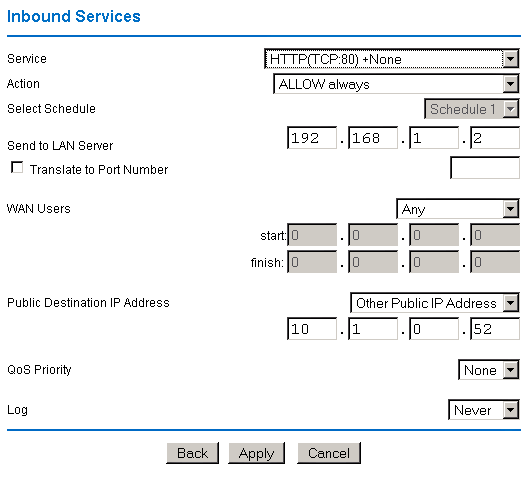
- In the Add/Edit menu (shown below), select the HTTP service for a Web server.
- Select Action ALLOW always.
- For Send to LAN Server, enter the local IP address of your Web server PC.
- For Public Destination IP Address, select Other Public IP Address.
- Enter one of your public Internet addresses that will be used by clients on the Internet to reach your Web server.
- Click Apply.
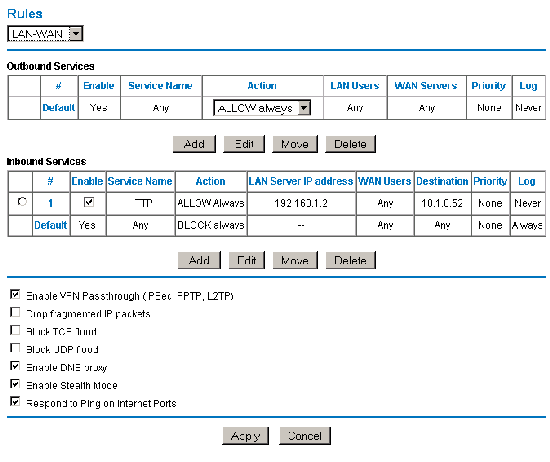
Your rule now appears in the Inbound Services table of the Rules menu (shown below). This rule is different from a normal inbound Port Forwarding rule, in that the Destination box contains an IP Address other than your normal WAN IP Address.
Testing the connection:
From a PC on the Internet, type http://<IP_address>, where <IP_address> is the public IP address you have mapped to your Web server. Your Web server's home page appears.
Notes: Firmware and product link is http://support.netgear.com/product/FVX538v2