

Note: This article dates from 2005, but has current readers. Current Firmware revision is V6.3.3.6 Editor February 2014
To upgrade from version 2.x, the switch must be reset to factory defaults after the upgrade, so write down all the configuration information you changed on your switch. After the switch is upgraded, follow the instructions below to reset the switch, and then manually reconfigure.
If you are upgrading from version 2.0.0.x firmware, first upgrade to firmware version 2.0.1.12.
Do not download a binary configuration file created with the switch running version 2.x to a switch running version 3.x!
(After the upgrade, the switch may keep rebooting. Use the same procedure to stop the rebooting.)
The switch pauses at “Startup – Main Menu” when booting, as shown below.
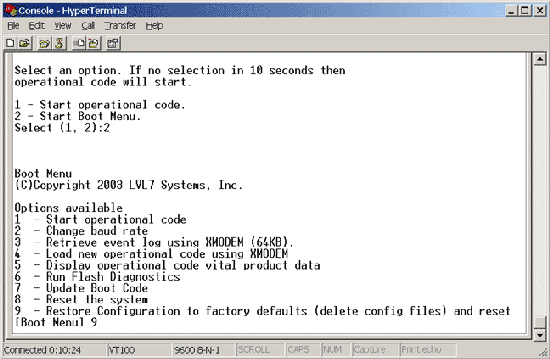
- Type 2 to start boot menu (as shown).
- Type 9 to restore configuration to factory defaults (as shown).
- Type 1 to start operational code.
Doc: N101464.asp April 28, 2005