

PLW1000 helps you expand your wireless network as it creates a new WiFi network for your home. You just need to plug in your PLW1000 to any power outlet in your home and wait for it to connect to your existing powerline network. If your powerline network is already secured, your new PLW1000 will not be able to detect your existing powerline network. This article guides you on how to add your new PLW1000 to your secured powerline nework.
To add a new PLW1000 to a secured powerline network:
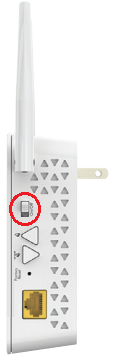
- Plug in your PLW1000 to your power outlet. Wait for the LEDs to turn on. If the device is not turning on, check the On/Off switch on the side.
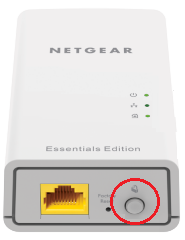
- Press the Security button on one of the powerline adapters that is already connected to the powerline network.
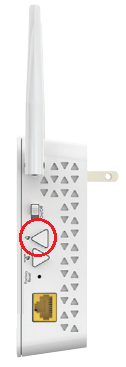
- Within two minutes, press the Security button on your PLW1000.
- Once the Pick-A-Plug LED on your PLW1000 is lit, it means that it’s already connected to your existing powerline network.

You have successfully added a new PLW1000 to a secured powerline network
Last Updated:07/07/2025
|
Article ID: 31527