

D7000 has a diagnostic page that you can use to perform various tasks such as DNS Lookup and Ping an IP address.
Procedure:
- Plug in the power adapter of your modem router to the power outlet.
- Turn on the modem router and wait for the power LED to become solid green or white.
- Open an Internet browser and go to http://www.routerlogin.com.
- Type its login credential. Default username is admin and default password is password.
- NETGEAR genie page opens. Click on Advanced tab and click on Administration.
- Click on Diagnostics.
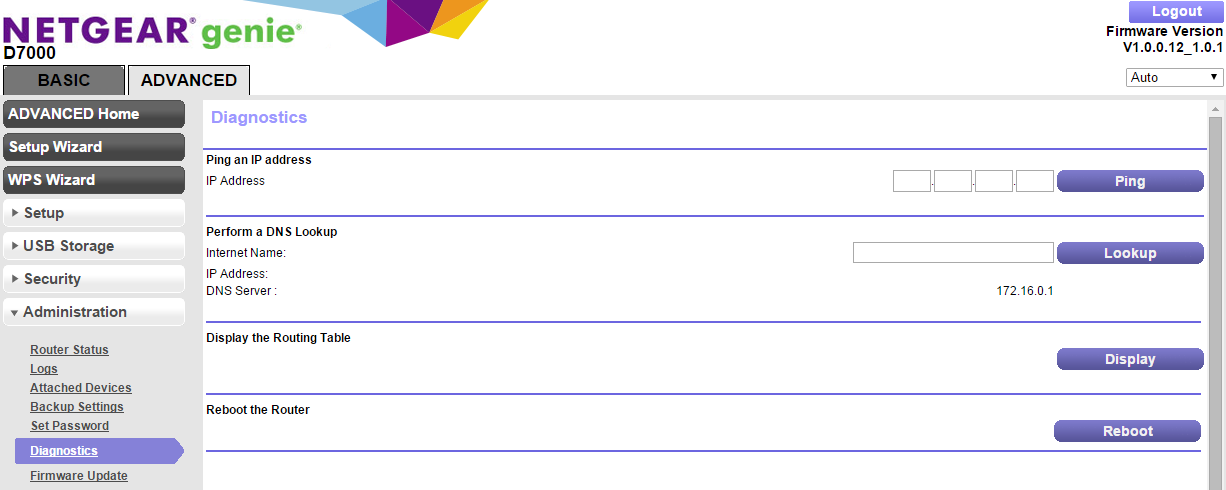
Ping an IP address:
Use this to send a ping packet request to the specified IP address or Host Name. This is often used to test a connection. If the request times out (no reply is received), this usually means the destination is unreachable.
Perform a DNS Lookup:
A DNS (Domain Name Server) converts the Internet name (e.g. www.netgear.com) to an IP address. If you need the IP address of a Web, FTP, Mail or other Server on the Internet, you can do a DNS lookup to find the IP address.
Display the Routing Table:
This operation will display the internal routing table. This information is used by Technical Support and other staff who understand Routing Tables.
Reboot the Router:
Use this button to perform a remote reboot (restart). You can use this if the Router seems to have become unstable or is not operating normally.