

Before Upgrading to v11.0
Make sure you are running firmware version 10.0.0.53. Updating to the 11.0.0.x firmware requires that you are running on the 10.0.0.53 firmware.
Checking current running image
- Web management
Go to Maintenance > File Management > Dual Image Configuration
Active Image displays which image the switch is currently running from, Version will display the active version on that image
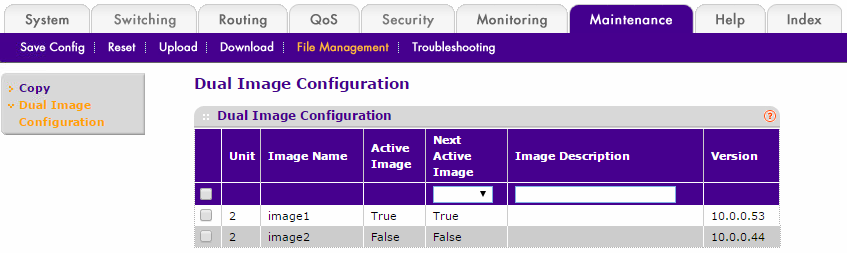
- From CLI
(M5300-28G) #show bootvar
Image Descriptions
image1 :
image2 :

Images currently available on Flash
--------------------------------------------------------------------
unit      image1      image2     current-active        next-active
--------------------------------------------------------------------
2   10.0.0.53   10.0.0.44             image1             image1
The switch is ready to be upgraded to version 11.0.0.x code on image 1.
If your switch is not running firmware version 10.0.0.53 and you attempt to upgrade the firmware to version 11.0.0.x you will receive an error message similar to one of the following examples
- HTTP upload
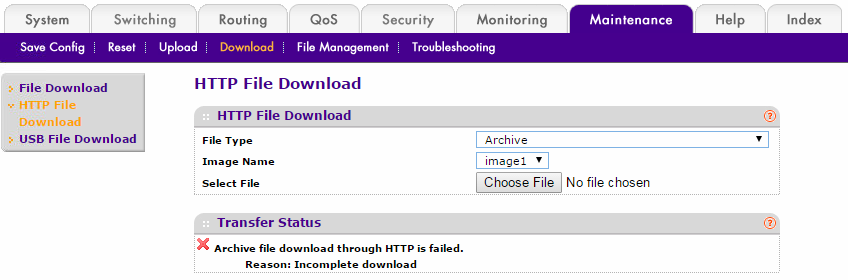
- TFTP upload from web management

- TFTP upload using CLI
- where image 2 is NOT running 10.0.0.53
(M5300-28G) #copy tftp://192.168.1.10/m5300v11.0.0.10.stk image2
Mode........................................... TFTP
Set Server IP.................................. 192.168.1.10
Path........................................... ./
Filename....................................... m5300v11.0.0.10.stk
Data Type...................................... Code
Destination Filename........................... image2
Management access will be blocked for the duration of the transfer
Are you sure you want to start? (y/n) y
File transfer in progress. Management access will be blocked for the duration of the transfer. please wait...
TFTP Code transfer starting...
File transfer failed!
For full upgrade instructions, please refer to the Version 11.0.0.10 Release Notes
Last Updated:10/17/2025
|
Article ID: 28442