

Factory Default Process on GS724Tv4, GS716Tv3, and GS748Tv5
On smart switch models GS716Tv3, GS724Tv4, and GS748Tv5, recoveryApp mode is introduced in firmware version V6.3.1.x. Its function is to reflash firmware to the switch in abnormal cases where both firmware images have become corrupt.
To enter recoveryApp mode:
- Insert a pin into the Factory Default pinhole.
- Hold the pin in place for longer than 9 seconds.
The switch has now entered recovery App mode and it can be accessed from the Smart Control Center.
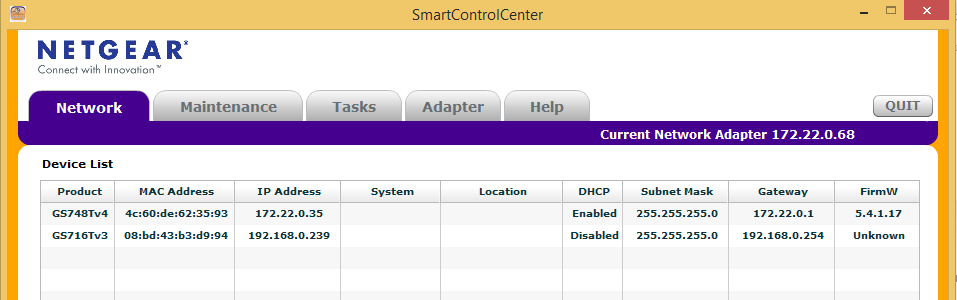
When in recoveryApp mode and viewing the switch using the Smart Control Center, the firmware shows as unknown. See the following example where GS748Tv4 is booted normally and GS716Tv3 is booted to recoveryApp mode.
To exit recoveryApp mode:
Either reboot the switch or initiate the factory default procedure again, but remove the pin before 9 seconds.
Last Updated:07/07/2025
|
Article ID: 25386