

The following image shows how to connect the cables to your NETGEAR router:
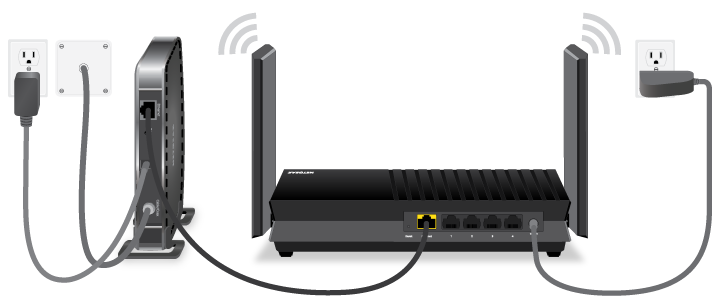
To connect the cables to your NETGEAR router:
- Connect your modem to the wall jack for your Internet service.
If your modem has a backup battery, remove the battery. - Plug in and turn on your modem.
If your modem has a backup battery that you removed in step 1, put it back in the modem. - Using the Ethernet cable included with your router, connect the Ethernet port on your modem to the Internet port of your router.
Some routers might label the port WAN instead of Internet. - (Optional) If you have computers, video game consoles, or other devices that you want to connect via Ethernet, use an Ethernet cable to connect each device to a LAN port on your router.
- Connect the power adapter to your router and plug the power adapter into an outlet.
Your router’s cables are connected.
After connecting the cables to your NETGEAR router, you can turn the router on and finish installing it using the NETGEAR Nighthawk app or router web interface. For more information:
- How do I set up and install my NETGEAR router?
- How do I install my NETGEAR router using the router web interface?
Last Updated:07/07/2025
|
Article ID: 25343