

This screen lets you configure the time-related settings of your wireless controller and managed access points.
To configure time settings:
- Open a web browser. In the browser's address field, type the http:// followed by the IP address that you assigned to the wireless controller.
By default, the IP address is 192.168.0.250. If you have not yet assigned another IP address to the wireless controller, type http://192.168.0.250.
The wireless controller's login screen displays. - Enter your user name and password.
If you have not yet personalized your user name and password, enter admin for the user name and password for the password, both in lowercase letters. - Click the Login button.
The wireless controller's web management interface opens and displays the Summary screen. - Select Configuration > System > Time.
The Time Settings screen displays:
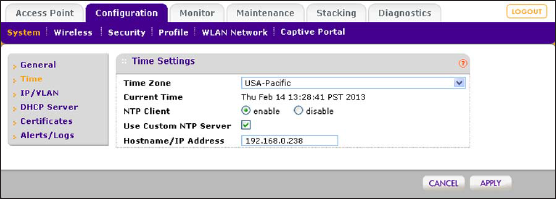
- Configure the settings as described in the following table:
Setting Description Time Zone From the menu, select the local time zone for your country or region. Current Time This field is a nonconfigurable field that displays the current time at your location. NTP Client Select the Enable radio button to use a Network Time Protocol (NTP) server to synchronize the clock of the wireless controller and managed access points.
Select the Disable radio button if you do not want to use an NTP server.Use Custom NTP Server Select the Use Custom NTP Server check box if you want to use an alternate NTP server. By default, the NETGEAR NTP server is used. Hostname/IP Address Enter the host name or IP address of the NTP server, if you are using a custom NTP server. - Click the Apply button.
Last Updated:10/17/2025
|
Article ID: 25164