

The GS516TP, GS728TP, GS728TPP, and GS752TP smart switches differ in hardware from other smart switches.
On these models, routing mode rather than switching mode is enabled by default. When you change from routing mode to switching mode, or the other way around, from switching mode to routing mode, the switch reboots. These modes have the following restrictions:
- Routing mode. You can configure VLAN routing and static routing. However, if you disable routing mode and enable switching mode, VLAN routing and static routing are no longer supported.
- Switching mode. You can configure dynamic VLAN assignment and DiffServ simple policies (that is flow-based policies). However, if you disable switching mode and enable routing mode, dynamic VLAN assignment and DiffServ simple policies are no longer supported.
The following figures show how the routing and switching modes affect the screens of the web management interface:
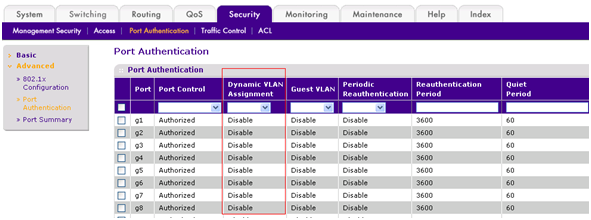
- Dynamic VLAN assignment. The following figure shows the Port Authentication screen of the web management interface. In routing mode, the Dynamic VLAN Assignment column does not display.
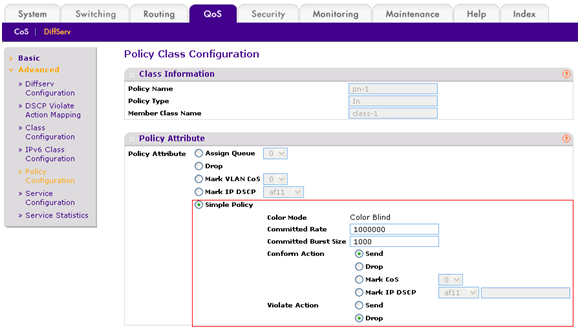
- DiffServ simple policy. The following figure shows the Policy Class Configuration screen of the web management interface. In routing mode, the Simple Policy buttons, fields, and menus are not displayed.
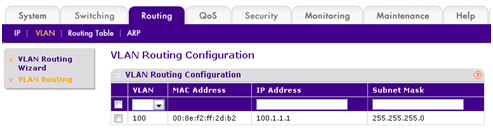
- VLAN routing. The following figure shows the VLAN Routing Configuration screen of the web management interface. In switching mode, this screen does not display.
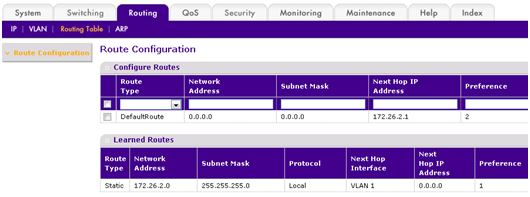
- Static routing. The following figure shows the Route Configuration screen of the web management interface. In switching mode, this screen does not display.
Last Updated:07/07/2025
|
Article ID: 24756