

For information about the Router Discover protocol, see the “What is the Router Discovery protocol
NOTE: Before you configure the settings for the Router Discover protocol, first create the routing VLAN interfaces that you want to use on your smart switch.
To configure the settings for the Router Discovery protocol:
- Open a web browser.
- In the browser address field, type the IP address of the smart switch.
The default IP address is 192.168.0.239 and the default subnet mask is 255.255.255.0.
You are prompted to enter your password.
- Type the password in the Password field.
The default password is password. Passwords are case-sensitive.
- Click the Login button.
After the system authenticates you, the System Information screen displays.
- Select Routing >Routing Discovery.
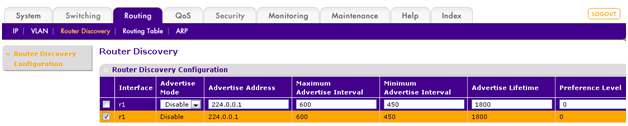
- Select the router interface that you want to configure by selecting its associated check box in the leftmost column of the table, or configure all router interfaces by selecting the check box in the heading row of the table.
- In the table, specify the following settings:
- Advertise Mode. From the menu, select Enable to enable the router interface to advertise router advertisements.
- Advertise Address. Specify the IP address for the router interface.
- Maximum Advertise Interval. Specify the maximum time in seconds that is allowed between router advertisements that are sent from the router interface.
- Minimum Advertise Interval. Specify the minimum time in seconds that is allowed between router advertisements that are sent from the router interface.
- Advertise Lifetime. Specify the time in seconds after which advertisements that are sent from the router interface time out.
- Preference Level. Specify the preference level of the router as a default router relative to other routers on the same subnet. Enter an integer. A higher number indicates a higher preference.
- Click the Apply button.
The router interface now advertises router discovery messages.
Last Updated:07/07/2025
|
Article ID: 24711