

For information about the Smart Control Center feature, see the “What is the Smart Control Center on a smart switch
To configure basic settings of a smart switch through the Smart Control Center:
- On the computer on which the Smart Control Center is installed, turn off the firewall temporarily.
The firewall might prevent the Smart Control Center from discovering the smart switch.
- Start the Smart Control Center by double-clicking the Smart Control Center icon on your desktop or by clicking the icon in the Windows Start menu.
The Network screen displays and the Smart Control Center discovers the smart switch and other devices in the network. (For more information, see the “To discover a smart switch through the Smart Control Center
- On the Network screen, select a smart switch by clicking the table row that displays the smart switch.
- On the Network screen, click the Configure Device button.
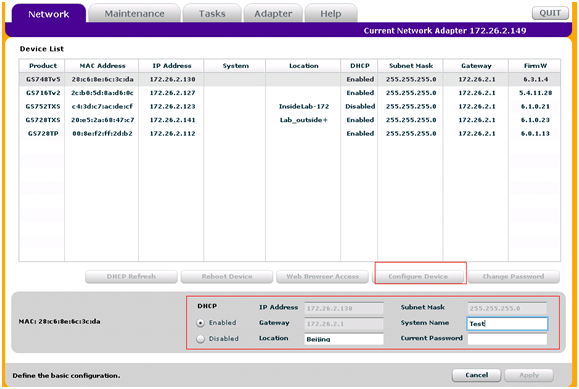
The screen expands to display additional fields at the bottom.
You can now change the IP address and subnet mask, location, system name, and password to access the smart switch.
Last Updated:07/07/2025
|
Article ID: 24698