

Bug Fixes / Enhancements:
- Changed default wireless security to None.
- Upgraded PLC FW to MAC-QCA7420-v1.1.1-00-X-FINAL.V0406
- Fixed the specific WOL packets would be blocked by switch issue (Requested by Netgear Roberto).
- Fixed the WLAN driver would hang issue on HT40 + disable coexistence.
- Fixed the language update wouldn't be reflected on GUI issue.
- Replaced virtual_display with label in config_methods to fix Win7 zero-config would show AP-PIN issue.(Suggested by Netgear Lancelot).
- Fixed the WPS-Client IOT issue with Cisco AP.
- Added a mechanism to update a generic ART calibration data if the device was factory produced before V0.4.0.5.(Due to the previous produced device's calibration data was problematic).
Installation Instructions:
- Using the Download Link below, download and extract the new firmware to a convenient place such as your desktop. The filename after extracting is XAVN2001-V0.4.0.7.img
Download Link: http://www.downloads.netgear.com/files/GDC/XAVN2001/XAVN2001-V0.4.0.7.zip
- Log in to the router using a Web browser. The URL is http://www.routerlogin.net.
- Login the XAVN2001 HTTP WEB GUI and upgrade the firmware.
- You can get YOUR XAVN2001 IP address information from powerline utility. This is an example for XAVN2001 IP address.
-
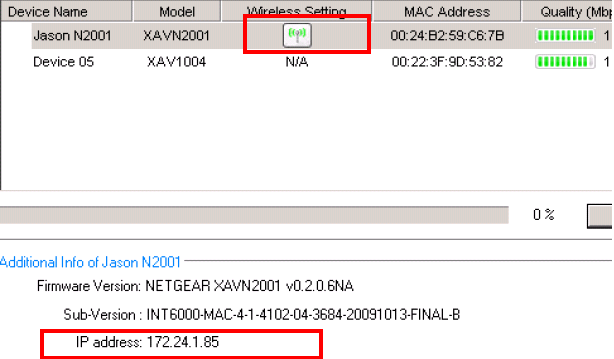
- Open the IE and input the ip address (or click the wireless icon). You can login the web configuration and upgrade the firmware from firmware upgrade options.
- Please do hardware/software factory reset after you upgrade the firmware > Very important
Last Updated:10/17/2025
|
Article ID: 24672