

Overview
This document outlines the reasons why replicating iSCSI LUN’s is not possible using ReadyNAS Replicate on OS6 ReadyNAS systems
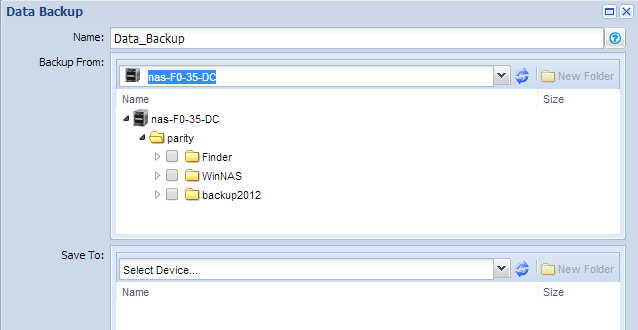
When creating a Replicate job using the ReadyNAS Replicate portal, it is not possible to select an iSCSI LUN as the source (screenshot below).
In previous models of ReadyNAS, it was possible to select an iSCSI LUN as the source of a replicate job. However, it is neither recommended nor supported by NETGEAR.
In this example, a LUN is present on the ReadyNAS as Luntest1.
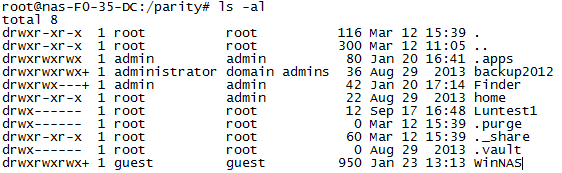
However, this LUN is not available to select as a source when creating the job in the Replicate portal.
The reasons for not being able to replicate iSCSI LUN’s on OS6 ReadyNAS models are the same as those outlined for why replicating iSCSI LUN’s is not supported on ReadyNAS OS4** and OS5*** models.
- The Replicate protocol is not designed for block-level replication, which is needed to replicate an iSCSI LUN consistently.
ReadyNAS Replicate uses the rsync protocol to copy data from source to destination using file-level replication. The rsync protocol is ideal when replicating files and folders. However, the protocol is not designed for block-level replication, which is needed to replicate an iSCSI LUN consistently.
When an iSCSI LUN is created on the ReadyNAS, the LUN is seen as one large file. This happens regardless of any changes that are made at the file system level within the LUN.
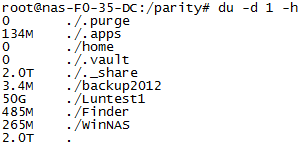
For example, if a 50GB LUN is created, the NAS sees the LUN as one file, 50 GB in size. To replicate the LUN, rsync must copy the entire 50 GB file from source to destination. If the LUN is formatted as NTFS and only 5GB of data is used in the NTFS file system, rsync still sends the entire 50 GB file from source to destination.
Example.
A LUN is created, Luntest1 = 50 GB
- Too many issues arise as changes are made within the LUN.
When changes are made within the LUN at the file system level, rsync is not able to calculate efficiently the changes to the entire LUN file. This inefficiency can lead to the job timing out on the Replicate portal and returning a failure report.
The initial replication of the LUN might be successful. However, major issues are seen on subsequent runs of the replicate job. When the replicate job is due to run again, rsync checksums the large LUN file. This checksum operation can be time consuming and often times out or gives up, leading to the failure of the job. The bigger the size of the LUN, the harder it is for rsync to checksum the file before trying to send only the changed portions of the file. Potentially, it can take longer for rsync to calculate the changes than to replicate the entire LUN file again.
- Use of the replicated LUN for failover or restoration of the LUN is difficult.
If the LUN is synchronized from source to destination, many more steps are involved than simply connecting the iSCSI initiator to the LUN on the destination NAS, as doing so causes corruption to the LUN and a potential loss of all data within that LUN. To attempt to initiate a connection to the LUN on the destination NAS requires many changes to the iSCSI configuration from the backend of the NAS, which is not supported by NETGEAR.
NETGEAR recommends:
For consistent replication of iSCSI LUNs NETGEAR recommends the use of the ReadyDATA product family, which uses block-level replication. Block-level replication sends only changed blocks for shares and LUNs, and bandwidth demands and replication time are dramatically reduced. ReadyDATA also replicates unlimited snapshots along with files and data, so that you have complete copies of your data sets from a specific point in time that you can easily access and restore.
For more information, see the following links on the ReadyDATA products family and ReadyDATA Replicate
http://www.netgear.com/business/products/storage/readydata/
*OS6 ReadyNAS systems use Software Version 6.1.X – ReadyNAS RN 102/104/2120/312/314/316/3220/4220/516/716
**OS4 ReadyNAS systems use RAIDiator 4.2.X version of firmware – ReadyNAS 1500/2100/3100/3200/4200/NVX/Pro/Pro Pioneer/Ultra/Ultra Plus
***OS5 ReadyNAS systems use RAIDiator 5.3.X version of firmware – ReadyNAS Duo v2/NV+ v2
References:
How Rsync works Rsync Wiki link