

This article will show how to enable the NAT function of the EX6100. This is useful when connecting to a public network or to have a separate private network.
To enable NAT:
- Make sure that the wireless computer, tablet or smartphone is connected to the EX6100 wireless network.
- Open an internet browser and go to www.mywifiext.net.
- When prompted, type admin as default username and password for default password.
- Click Setup > LAN Setup.
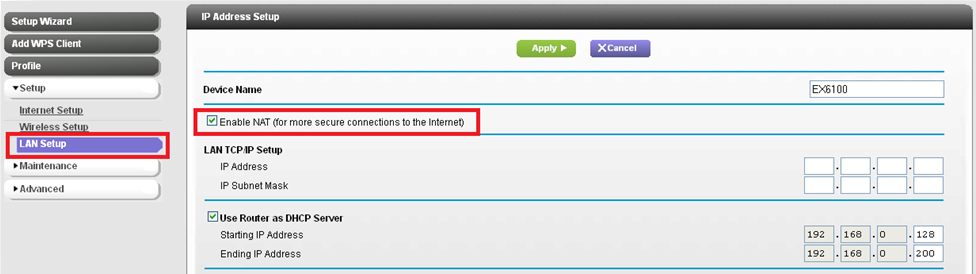
- Select Enable NAT (for more secure connections to the Internet).
- Type the IP Address and IP Subnet Mask.
- Click Apply.
Last Updated:07/07/2025
|
Article ID: 24431