

Prerequisites
- Working wired connection using Ethernet cable.
- Initial Internet access using wired Desktop or Laptop is working.
- Ensure that WiFi LED symbol is turned on. If not, turn it on using the wireless button on your router.
Overview:
This article provides information on re-enabling wireless signal or capability of the router.
Symptoms
Unable to detect the wireless network of the router.
Resolution
- Launch a web browser (for example: Internet Explorer, Mozzila Firefox, Google Chrome, etc..) and type 192.168.0.1

- Click on Wireless Settings under Advanced.
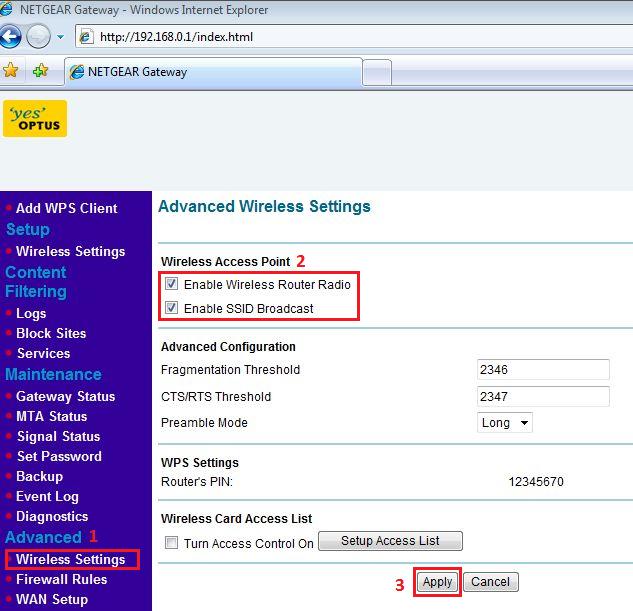
Notes:
- Enable Wireless Router Radio: This allows the user to turn on/off the wireless of your CG3000. The wireless icon on the front of the router will also display the current status of the Wireless Router Radio to let you know if it is disabled or enabled.
- Enable SSID Broadcast: When enabled, the wireless name (SSID) will be detected by wireless devices within range, disabling it will cause the name not to be detected by wireless devices (Hidden Wireless Network).
- How to connect devices to a Wireless Network:
This applies to:
- CG3000-1STAUS (Optus)
Last Updated:10/17/2025
|
Article ID: 24369