

By default, the router acts as a Dynamic Host Configuration Protocol (DHCP) server. The router assigns IP, DNS server, and default gateway addresses to all computers connected to the LAN. The assigned default gateway address is the LAN address of the router.
These addresses must be part of the same IP address subnet as the router's LAN IP address. Using the default addressing scheme, define a range between 192.168.1.2 and 192.168.1.254, although you can save part of the range for devices with fixed addresses.
To specify the pool of IP addresses that the router assigns:
1. Launch an Internet browser from a computer or wireless device that is connected to the network.
2. Type http://www.routerlogin.net or http://www.routerlogin.com.
A login screen displays.
3. Enter the router user name and password.
The user name is admin. The default password is password. The user name and password are case-sensitive.
The BASIC Home screen displays.
4. Select ADVANCED > Setup > LAN Setup.
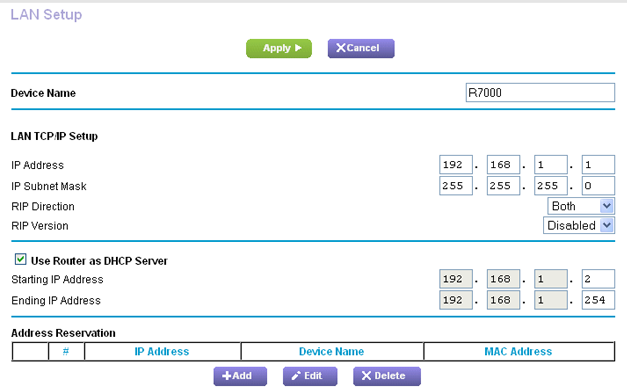
5. Make sure that the Use Router as DHCP Server check box is selected.
6. Specify the range of IP addresses that the router assigns:
a. In the Starting IP Address field, type the lowest number in the range.
This IP address must be in the same subnet as the router.
b. In the Ending IP Address field, type the number at the end of the range of IP addresses.
This IP address must be in the same subnet as the router.
7. Click the Apply button.
Your settings are saved.
The router delivers the following parameters to any LAN device that requests DHCP:
-
An IP address from the range that you have defined
-
Subnet mask
-
Gateway IP address (the router's LAN IP address)
-
DNS server IP address (the router's LAN IP address)