

This feature is available only for HTTP. WebDAV is an extension of the HTTP protocol that facilitates document management and editing. Features of WebDAV include maintenance of document properties such as author, creation date and modification date, as well as overwrite protection.
To enable WebDAV on an individual shared folder:
1. On the folder settings pop-up screen, click the Network Access tab.
2. Click the HTTP file-sharing protocol button.
3. Click the WEBDAV tab on the left side of the pop-up screen.
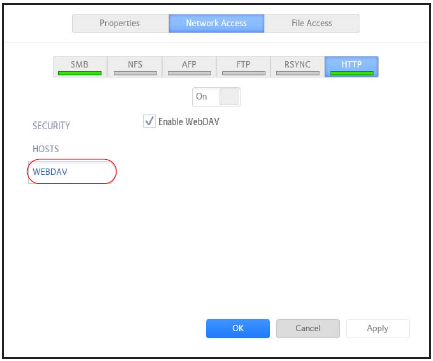
4. Select the Enable WebDAV check box.
5. Click the Apply button.
6. Click the OK button.
Your changes are saved and the pop-up screen closes.
Last Updated:07/07/2025
|
Article ID: 23847