

To detach a write or read boost disk from a volume:
1. Select System > Storage.
The Storage screen displays (see the figure in Step 3).
2. To the left of the graphical enclosure, click the volume from which you want to remove write or read disks.
3. Perform one or both of the following actions in the enclosure:
-
Click the write boost disk or disks that you want to remove from the volume. You can select disks with a yellow color coding only.
-
Click the read boost disk or disks that you want to remove from the volume. You can select disks with an orange color coding only.
The selected disk or disks are highlighted, and to the left of the enclosure, the Detach button displays:
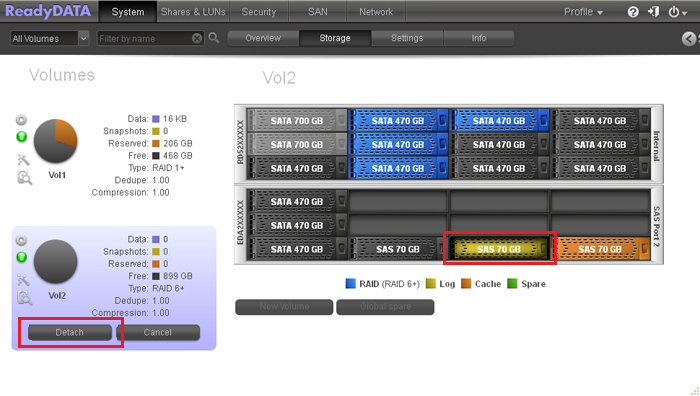
Note: The previous figure shows SAS disks that are used as write boost and read boost disks. However, you would normally use SSDs for such purposes.
4. Click Detach.
Updated information about the volume displays to the left of the enclosure. A detached write or read disk becomes available again for other purposes (the color of the disk turns black).