Overview:
This article will help provide troubleshooting steps when facing issues intermittent wireless disconnections using the A6200/A6210/WNDA3100v2 wireless adapter.
Symptom:
- Computer with NETGEAR A6200/A6210/WNDA3100v2 wireless adapter installed is able to connect to a wireless network, but sometimes the wireless connection drops for no apparent reason.
Resolution:
-
Make sure you have the latest firmware on your wireless router or Access Point.
-
Make sure you have installed the latest driver for your adapter: http://downloadcenter.netgear.com/
-
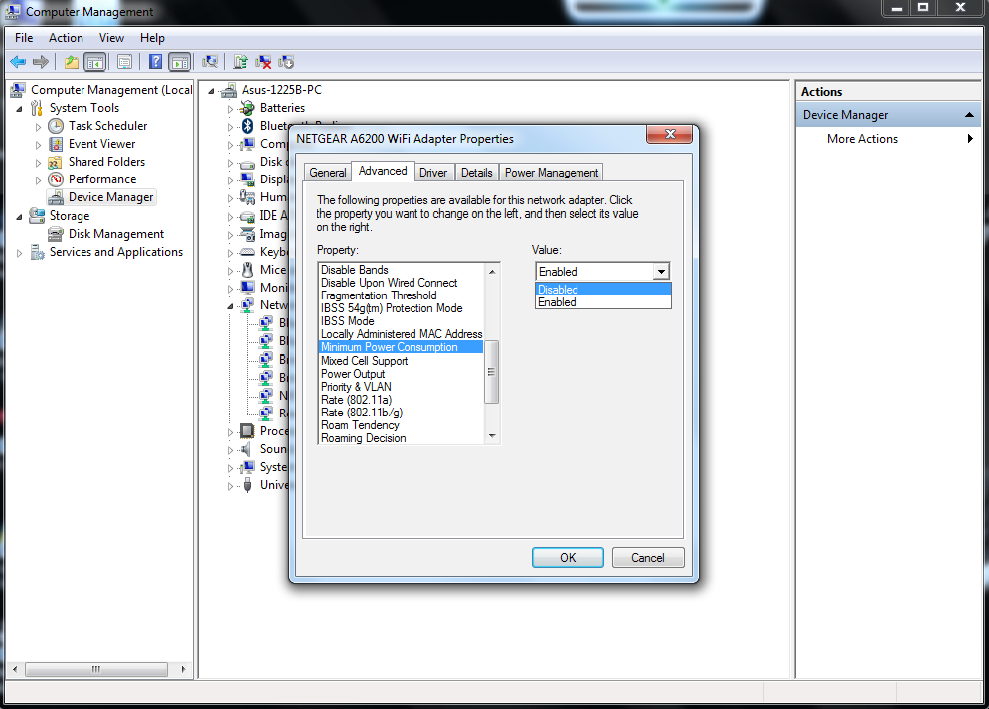
Try disabling the Minimum Power consumption feature on the adapter :
-
Go to Windows Start button and right-click on Computer. Select Manage.
-
Click on Device Manager and find A6200/A6210/WNDA3100v2 under Network adapters.
-
Double-click on NETGEAR A6200/A6210/WNDA3100Dv2 to open adapter properties.
-
Select the Advanced tab, find the parameter Minimum Power Consumption and set value to Disabled (default value is Enabled).
-