

To configure NFS:
- Select System > Settings > Services
- Click the NFS button.
The NFS settings screen displays.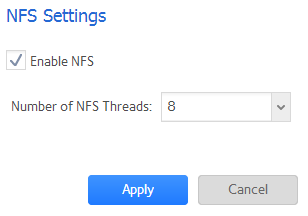
- Configure the NFS settings as explained in the following table:
Item Description Enable NFS Select the check box to enable NFS globally. Clear the check box to disable NFS globally. Number of NFS Threads You can select from 8 to 32 threads. If many clients connect to the ReadyNAS using the NFS protocol, increasing the number of NFS threads can improve performance.
- Click the Apply button.
Your changes are saved.
This article applies to the following ReadyNAS and EDA storage system models:
- ReadyNAS 102
- ReadyNAS 104
- ReadyNAS 312
- ReadyNAS 314
- ReadyNAS 316
- ReadyNAS 516
- ReadyNAS 2120
- ReadyNAS 3220
- ReadyNAS 4220
- EDA 500
Last Updated:07/07/2025
|
Article ID: 23098