

The following figure shows the front and side panels of ReadyNAS 314:
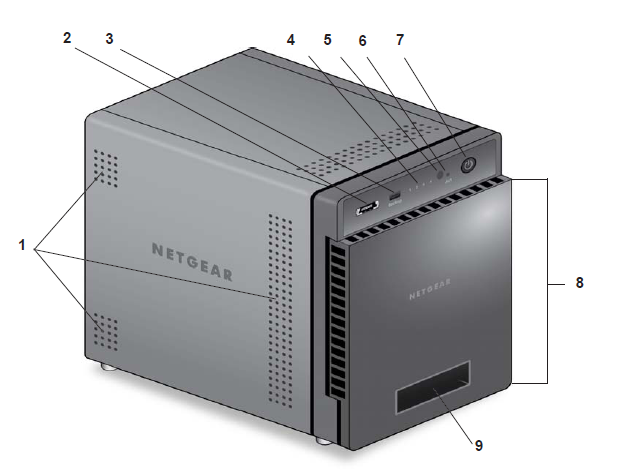
1. Exhaust vents
2. Shared USB 2.0 and E-SATA port
3. Backup button and LED
4. Disk LEDs
5. Infrared remote receiver
6. Disk activity LED
7. Power button and LED
8. Drive bay door
9. Status display screen
The following figure shows the drive bays of ReadyNAS 314:
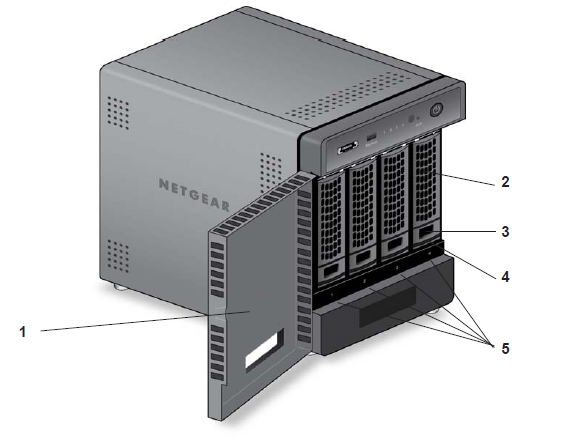
1. Drive bay door
2. Disk tray handle
3. Recessed disk tray locking mechanism
4. Disk tray release latch
5. Drive bays
The following figure shows the rear panel of ReadyNAS 314:
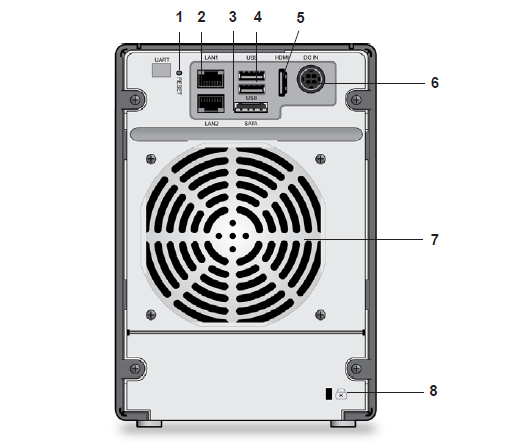
1. Reset button
2. LAN ports with LED status indicators
3. E-SATA port
4. USB 3.0 ports
5. HDMI port
6. Power cable socket
7. Exhaust fan
8. Kensington lock
Last Updated:07/07/2025
|
Article ID: 23024