

Deduplication (dedupe for short) is a method to remove redundant data blocks from a data set.
Only unique blocks are written to disk and any blocks that are identical to an existing block will only be referenced as a component of multiple data sets.
What this means is that the capacity of the disk will be dedicated to unique and distinct blocks of data while the inodes maintain files structured correctly by using block components shared across many inodes. This results in a dramatic increase of disk efficiency by maintaining a dedupe table in memory so that new data arriving can be quickly compared to existing data and redundant blocks omitted from taking disk space.
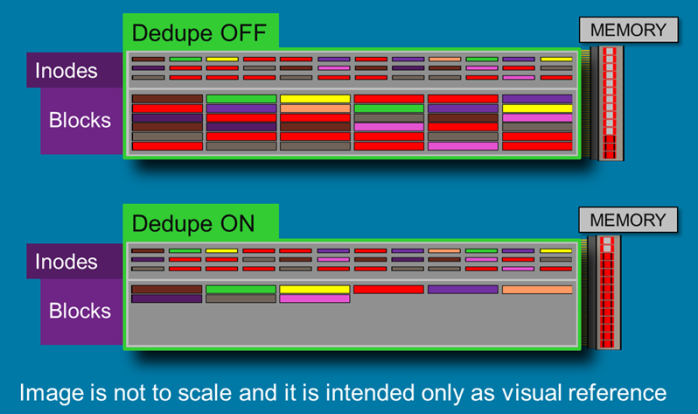
Again, this is done at great expense of memory.
The space that needs to be allocated on RAM is a proportion of the actual number of unique blocks that are written to disk.
For every single dedupe table entry it takes approximately 320 bytes multiplied by the number of unique blocks it references. 20 TB of unique data stored in 128K records or roughly 1TB of unique data in 8K records would require about 32 GB of physical memory.
Be judicious when selecting to use dedupe. If your data has high possibility to contain duplicated blocks on disk, use a modestly sized store and enable it.
For example;
A data-store where collaborative efforts are employed would be an excellent time to use dedupe. Also, if several versions of the same document exist sharing the same images over and over, and mostly the same text, but with only small changes here and there, that would make another fine time to use it.
However we strongly discourage using deduplication on iSCSI implementation.
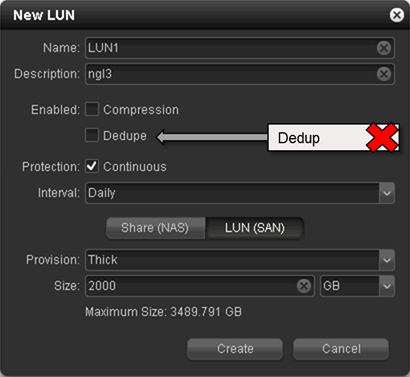
iSCSI uses a small block size (8k) to be able to align well and be managed by many different file systems.
Because it is more granular and because of the impact on the deduplication table it will consume a great amount of memory and should be avoided with iSCSI, particularly more so with THICK provisioned LUNs as they will load a dedupe table referencing “empty” space.
If you decide to use dedupe after all, we strongly advise you to use a read cache drive.
If you wish to dedupe your virtual environments we urge you to use the internal VM’s deduplication system.
Download the iSCSI and dedupe slides for more info.
If you need you can download the Microsoft PowerPoint viewer .