

Symptoms:
- Unable to connect to the Internet.
- Signal LED is off on the unit.
Resolution:
If you are unable to connect to the Internet, please check the following:
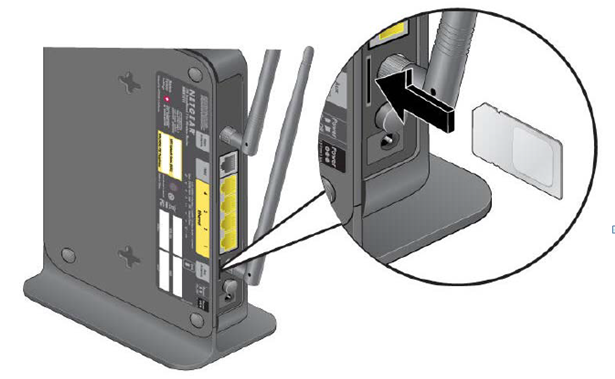
- Verify that the internet account is active through your ISP. A SIM card should have been provided to you. Please make sure to have it available. Gently insert the SIM card into the SIM card slot on the back of the MBR1515. You should hear a "click" sound when the SIM card has been inserted properly.
- Verify that the wireless broadband coverage is available where the MBR1515 will be located.
- Access the Main Menu of the GUI to verify that the broadband settings are correct. Contact your ISP if you are unsure.
- Check the location of the MBR1515.
- Move the unit closer to the window for better access to the internet signal. A Signal Quality LED that is off indicates no coverage in that area.
- Maintain recommended minimum distances between the unit and other household appliances to reduce interference.
Last Updated:07/07/2025
|
Article ID: 22145