

PIM-DM is appropriate for:
- Densely distributed receivers
- A ratio of few senders to many receivers (due to frequent flooding)
- High volume of multicast traffic
- Constant stream of traffic
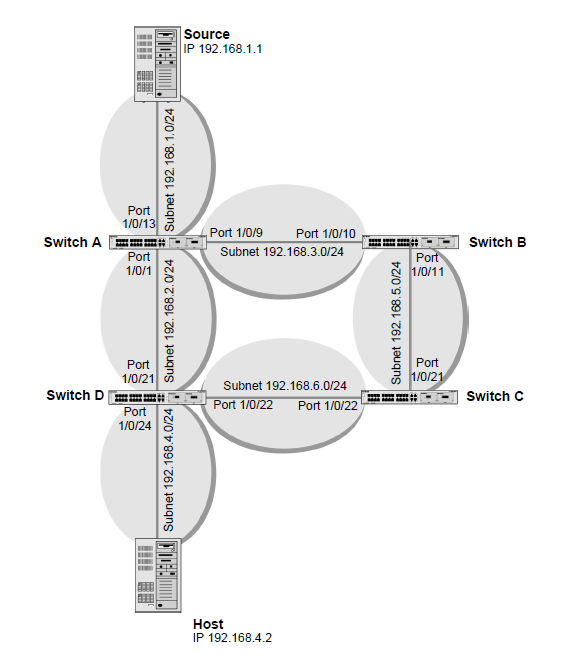
PIM-DM uses the existing unicast routing table and join, prune, and graft mechanism to build a tree. PIM-DM creates source-based shortest-path distribution trees making use of reverse path forwarding (RPF). PIM-DM cannot be used to build a shared distribution tree, as PIM-SM can. PIM-DM assumes that when a sender starts sending data, all downstream routers and hosts want to receive a multicast datagram. PIM-DM initially floods multicast traffic throughout the network. Routers that do not have any downstream neighbors prune back the unwanted traffic. Apart from the prune messages, PIM-DM makes use of two more messages: graft and assert. Graft messages are used whenever a new host wants to join the group. Assert messages are used to shut off duplicate flows onto the same multi-access network.
To minimize the repeated flooding of datagrams and subsequent pruning associated with a particular (S,G) pair, PIM-DM uses a state refresh message. This message is sent by the routers directly connected to the source and is propagated throughout the network. When received by a router on its RPF interface, the state refresh message causes an existing prune state to be refreshed. State refresh messages are generated periodically by the router directly attached to the source. There are two versions of PIM-DM. Version 2 does not use IGMP messages; instead, it uses a message that is encapsulated in IP packets with protocol number 103. In version 2, the Hello message is introduced in place of the query message.
For more information, see the following support articles:
- What is Protocol-Independent Multicast (PIM) and how does it work with my managed switch?
- How do I configure Protocol-Independent Multicast Dense Mode (PIM-DM) using CLI commands on my managed switch?
- How do I configure Protocol-Independent Multicast Dense Mode (PIM-DM) using the web interface on my managed switch?
This article applies to the following managed switches and their respective firmware:
- M5300 - firmware version 10.0.0.x
-
- M5300-28G (GSM7228S)
- M5300-5G (GSM7252S)
- M5300-28G3 (GSM7328Sv2h2)
- M5300-52G3 (GSM7352Sv2h2)
- M5300-28G_POE+ (GSM7228PSv1h2)
- M5300-52G-POE+ (GSM7252PSv1h2)
- M5300-28GF3 (GSM7328FSv2)
- XSM7224S - firmware version 9.0.1.x (license required to support the feature described in this article)