

The following example shows how to create a DHCP server with an IP address pool that is makes fixed IP to MAC address assignments.
- Select System > Services > DHCP Server > DHCP Server Configuration.
A screen similar to the following displays.
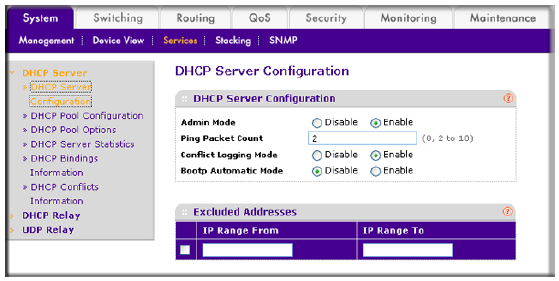
- For Admin Mode, select the Enable radio button.
- Click Apply to enable the DHCP service.
- Select System > Services > DHCP Server > DHCP Pool Configuration.
A screen similar to the following displays.
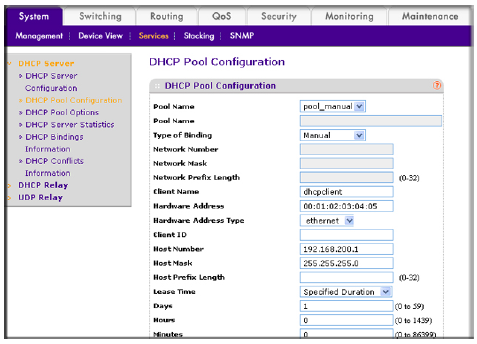
- Under DHCP Pool Configuration, enter the following information:
- In the Pool Name list, select Create.
- In the Pool Name field, enter pool_manual.
- In the Type of Binding list, select Manual.
- In the Client Name field, enter dhcpclient.
- In the Hardware Address field, enter 00:01:02:03:04:05.
- In the Hardware Type list, select ethernet.
- In the Client ID field, enter 01: followed by the Hardware Address.
For example, if the Hardware Address is 00:01:02:03:04:05, then the Client ID is 01:00:01:02:03:04:05 - In the Host Number field, enter 192.168.200.1.
- In the Network Mask field, enter 255.255.255.0.
As an alternate, you can enter 24 in the Network Prefix Length field. - In the Days field, enter 1.
- Click Add.
The pool_manual name is now added to the Pool Name drop-down list.
For more information, see the following support articles:
- What is a Dynamic Host Configuration Protocol (DHCP) server and how does it work with my managed switch?
- How do I configure a Dynamic Host Configuration Protocol (DHCP) reservation using CLI commands on my managed switch?
This article applies to the following managed switches and their respective firmware:
- M5300 - firmware version 10.0.0.x
-
- M5300-28G (GSM7228S)
- M5300-5G (GSM7252S)
- M5300-28G3 (GSM7328Sv2h2)
- M5300-52G3 (GSM7352Sv2h2)
- M5300-28G_POE+ (GSM7228PSv1h2)
- M5300-52G-POE+ (GSM7252PSv1h2)
- M5300-28GF3 (GSM7328FSv2)
- M4100 - firmware version 10.0.1.x
-
- M4100-26G (GSM7224v2h2)
- M4100-50G (GSM7248v2h2)
- M4100-26G-POE (GSM7226Pv1h1)
- M4100-50G-POE+ (GSM7248Pv1h1)
- M4100-26G-POE (FSM7226Pv1h1)
- M4100-50-POE (FSM7250Pv1h1)
- M4100-D12G (GSM5212v1h1)
- M4100-D10-POE (FSM5210Pv1h1)
- M7100 - firmware version 10.0.1.x
-
- M7100-24X (XSM7224)
- XSM7224S - firmware version 9.0.1.x
Last Updated:07/07/2025
|
Article ID: 21934